
Ducati Diavel Owners Manual: Maintenance indicator
This function indicates that the vehicle is about to or has travelled a distance for which an authorised ducati service centre should be contacted to have the general maintenance or oil change performed.
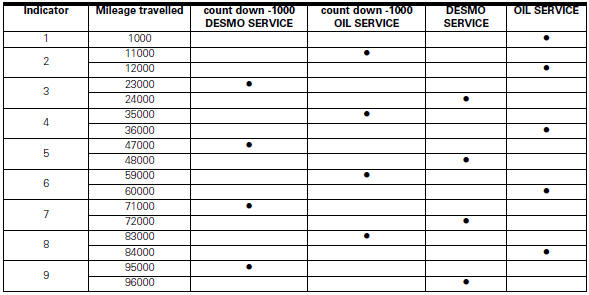
Maintenance table
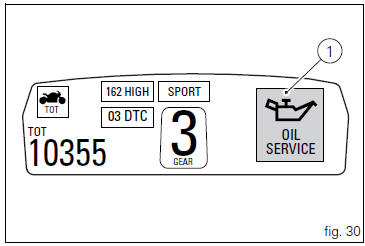
First warning - oil service 1000 km
The first warning is activated at 1000 km (600 miles) of odometer reading.
The (red) warning is activated as a large icon for 10 seconds upon every key-on (1, fig. 30) Then as a small warning that remains displayed (2, fig. 31) Until it is reset.
 Warning
This message can only be reset by the ducati dealer or authorised service centre that performs the maintenance.

 Riding style function (riding style change)
This function changes the motorcycle riding style.
Each riding style is associated with a different intervention
level of the traction control (dtc - ducati traction control)
and different engine ...
 Residual range indication when the service is due
After resetting the first oil service warning (triggered at
1000 km), upon every key-on the system displays the
indication of which type of service should be performed next
(oil service or desmo se ...
Other materials:
Abs disabling function
This function disables or enables the abs.
To access the function it is necessary to view the "setting" menu page 48, using
button (1, fig. 14) ?"
" or (2, fig. 14) ?"" select the "abs" function and
press the reset button
(12, fig. 12) To go to next ...
Refitting the timing belt driveshaft pulleys
To fit the circlip (10) in the driveshaft seat, use the tool code 88713.2834.
Install the inner spacer (17) on the driveshaft, taking care to align the
notch in the spacer with the slot for the woodruff
key.
Fit the first woodruff key (16) on the timing belt driveshaft.
Locate the ...
Refitting the primary drive gears and checking backlash
Fully degrease the crankshaft splined end and the corresponding spline on the
primary drive gear.
Position the spacer (c) onto the crankshaft.
Fit the driving gear (b) onto the crankshaft with the oil pump drive sprocket
facing the crankcase.
Temporarily secure the gear with the was ...