
Ducati Diavel Service Manual: Abs diagnosis
Note
The on-screen icons used during this procedure are explained in a table at the end of this section.
If the abs system is not working correctly, system diagnosis is possible through the dds diagnosis instrument.
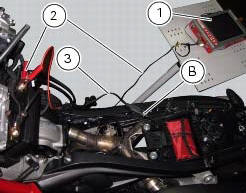
Turn on the dds diagnosis instrument (1) referring to the paragraph "tester power supply": use the power cord (2) part no. 97900.0230.
Connect the power supply cable (3) part no.97900.0227 Tot he power cord (2) part no. 97900.0230 And to the abs diagnosis connector (b) on the frame.
 Deactivating the service indication on the dashboard
The message "serv" is displayed on the dashboard, indicating that the
motorcycle should be serviced in accordance with
the programmed maintenance plan. This indication is activated after the first ...
 Icons table
...
Other materials:
Replacing the front phonic wheel sensor
Disconnect the front abs sensor (2) connector (a) from the main electric
wiring.
Open all the retainer clamps of the front abs sensor cable (2): refer to table
of sect. 7 - 6, Flexible wiring/hoses
positioning.
Loosen retaining screw (1) and remove the front abs sensor (2) with
ca ...
Removal of the clutch-side crankcase cover
Unscrew the screws (2), (3) and (5) securing the clutch-side crankcase cover
(1).
Tap around the edge of the cover with a plastic mallet to detach it from the
crankcase half.
Remove the clutch cover (1) paying attention to the centring bushing (12).
Check the condition of the cent ...
Refitting the gear interlock plunger and pawl assembly
On the special screw (3), fit the gear pawl lever (4), orienting it as shown
in the figure, the washer (2) with the square
edge side (d) facing the clutch-side crankcase half, and the spring (1),
positioning it so that the hook end (a) is facing
the gear pawl lever. Locate the hook end (a) of ...