
Ducati Diavel Owners Manual: Abs disabling function
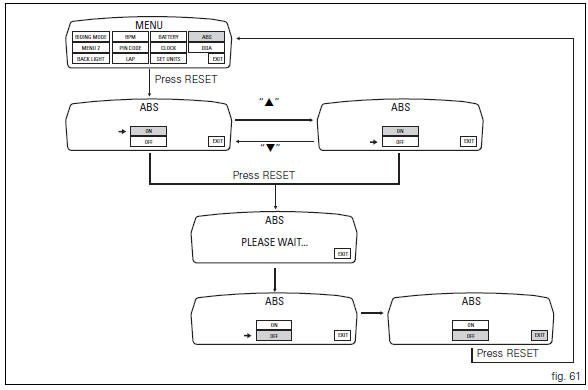
This function disables or enables the abs.
To access the function it is necessary to view the "setting" menu page 48, using
button (1, fig. 14) ?"
" or (2, fig. 14) ?" " select the "abs" function and
press the reset button
(12, fig. 12) To go to next page.
Function state is highlighted on the display (on in green or off in yellow); use
button (1, fig. 14) ?"
" or (2, fig. 14) ?" "
"
to shift the arrow on the left onto the new setting and
confirm by pressing the reset button (12, fig. 12) For 3
seconds.
After these 3 seconds the system checks whether the request was actually complied with; during the check the display will show the message "please wait...".
The new condition will be displayed after check time.
 Note
Note
If the disabling request was not met, it is recommended to repeat the procedure. If the problem persists, contact your ducati dealer or authorised service centre.
To exit the setting function, press the reset button (12, fig.
12) Where "exit" is highlighted.
 Units of measurement modification function
This function allows you to change the units of measurement
of the displayed values.
To access the function it is necessary to view the "setting" menu page 48, using
button (1, fig. 14 ...
 The immobilizer system
For additional antitheft protection, the motorcycle is
equipped with an immobilizer, an electronic system that
locks the engine automatically whenever the ignition switch
is turned off.
The grip ...
Other materials:
Reassembly of the connecting rods
Before starting, check that the crankshaft main bearing journals and big-end
journals are free of burrs or evident signs of
machining: if necessary, clean the surfaces with very fine emery cloth and oil.
Check that the grooves are in perfect condition with no signs of forcing.
Clean the cra ...
Riding mode customisation
This function customises each riding style.
To access the function it is necessary to view the ""setting" menu", using
buttons (1) "s" or (2) "t" select the "riding
mode" function and press the reset button (3) to enter the following page.
When accessing the function, the three riding modes ...
Fault indication
The dds (diagnosis ducati system) indicates all active errors and all
inactive but stored errors gathered by the bbs. A
simplified summary of the active errors is also shown in the master dashboard
service display when the dashboard is
switched on. Simultaneously, the eobd warning light is als ...