
Ducati Diavel Service Manual: Adjusting the front fork
The front fork used on this motorcycle has rebound, compression and spring preload adjustment.
This adjustment is done using the outer adjusters:
- Rebound damping;
- Inner spring preload;
- Compression damping.
Park the motorcycle in a stable position on its side stand.
Turn the adjuster (1) on fork leg top with a flat screwdriver to adjust rebound damping.
On the carbon model, adjustment is done using the knob (b) on the fork leg, without a screwdriver.
Turn the adjuster (3) on fork leg bottom with a flat screwdriver to adjust compression damping.
As you turn the adjusters (1) and (3), you will hear them click. Each click corresponds to different damping setting.
The stiffest damping setting is obtained with the adjuster turned fully clockwise to the "0" position. Starting from this position, turning counter clockwise, you can count the turns.
To change preload of the spring inside each fork leg, turn the hex. Adjuster (2) with a 22 mm hexagon wrench, starting from the fully open position (clockwise). From reference (a), every full turn clockwise corresponds to 1 mm of preload of the spring, up to a maximum of 15 mm, corresponding to 3 full turns.
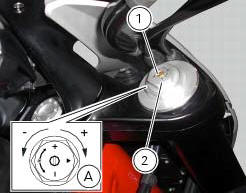
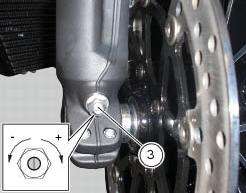
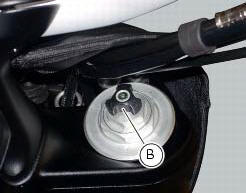
Standard settings, from fully open position, are as follows: compression: 1 turn and a half; rebound: 1 and a half turns.
Spring preload: fully open (counter clockwise).
Important
Adjust both fork legs to same settings.
 Adjusting the position of the gear change and rear brake pedals
The position of the gear change and rear brake pedals in relation to the
footrests can be adjusted to suit the preferred
riding position.
To modify the gear change pedal position act in the foll ...
 Adjusting the rear shock absorber
The adjuster (1) located on the lower connection holding the shock absorber
to the swingarm adjusts the damping during
the rebound phase (return).
The knob (2), located on the left side of the m ...
Other materials:
Total distance covered indicator: "odometer"
This function shows the total distance covered by the vehicle
(in km or miles depending on the specific application).
At key-on the system automatically enters this function.
The odometer reading is stored permanently and cannot be
reset.
If the distance travelled exceeds 199999 km (or 19 ...
Seat
Seat
Seat cover
Rubber mounting
Special screw
Plate
Latch
Spare parts catalogue
Diavel abs seat
Diavel carbon
abs
seat
Important
Bold reference numbers in this section identify parts not shown in the
figures alongside the text, but which can be found in
the exploded view ...
Indicator speed avg - average speed
This function shows the average speed of the motorcycle.
The calculation is made considering the distance and time travelled since the
last trip 1 reset. When trip 1 is reset, the
value is set to zero and the first available value is shown on the display 10
seconds after the reset. Dashes "- ...