
Ducati Diavel Owners Manual: Battery voltage indicator (battery)
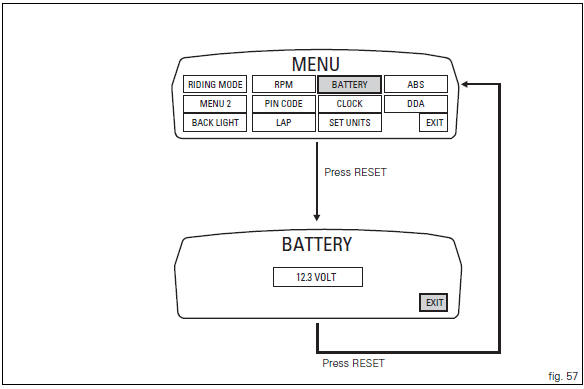
This function describes the battery voltage indicator.
To access the function it is necessary to view the "setting" menu page 48, using
button (1, fig. 14) ?" " or (2, fig.
14) ?" " select the "battery" function
and press the reset
button (12, fig. 12) To confirm.
The information will be displayed as follows:
- If battery voltage is between 11.8 And 14.9 Volt the reading will be displayed steady;
- If battery voltage is between 11.0 And 11.7 Volt the reading will be displayed flashing;
- If battery voltage is between 15.0 And 16.0 Volt the reading will be displayed flashing;
- If battery voltage is equal to or less than 10.9 Volt, "low" is shown flashing and the "vehicle/engine diagnosis - eobd" light (7, fig. 4) Comes on;
- If battery voltage is equal to or greater than 16.1 Volt, "high" is shown flashing and the " vehicle/engine diagnosis - eobd" light (7, fig. 4) Comes on.
 Note
Note
Dashes "- - -" appear if the reading is not available.
 Stored lap erase function
This function erases the stored laps.
To access the function it is necessary to view the "setting" menu page 48, using
button (1, fig. 14) ?"" or (2, fig.
14) ?"" ...
 Clock setting function
This function sets the clock.
To access the function it is necessary to view the "setting" menu page 48, using
button (1, fig. 14) ?"
"or (2, fig. 14) ?""select th ...
Other materials:
Trip 2 meter
This function shows the distance travelled since the trip meter was last
reset (in km or miles depending on the specific
application).
Press and hold (1) "s" for 3 seconds while in this function to reset the trip
odometer.
When the reading exceeds 9999.9, Distance travelled is reset and t ...
Overhauling the front wheel
Wheel bearings
Before checking the dimensions, check the wear on wheel bearings. Check for
wear by hand after cleaning and degreasing
the bearings in their seats.
Turn the inner race.
Check the amount of radial and axial play. Excessive play will cause vibration
and make the bike unstabl ...
Chain lubrication
The chain fitted on your motorcycle has o-rings that keep dirt
out of and lubricant inside the sliding parts.
So as not to damage these seals when cleaning the chain,
use special solvents and avoid aggressive washing with highpressure
steam cleaners.
After cleaning, blow the chain dry with ...