
Ducati Diavel Service Manual: Checking and overhauling the components
Clearance between the clutch drum and friction plates
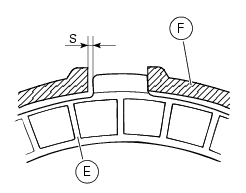
Insert a friction plate (e) in the clutch drum (f) and measure the clearance (s) with a feeler gauge.
Clearance "s" must not exceed 0.6 Mm.
If it does, renew the plates and, if necessary, the clutch drum.
Overhaul of the clutch plates
The clutch plates must not show any signs of blackening, grooves or deformation.
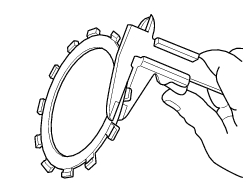
Measure the thickness of the friction plates; it should not be less than 2.6 Mm.
Important
The total thickness of the discs pack must not be less than 46.1 Mm.
Place the plate on a flat surface and check the amount of deformation with a feeler gauge.
Max. Flatness error: 0.2 Mm.

Overhaul of the pressure plate
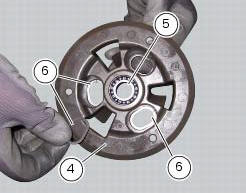
Check bearing (5) condition; renew the bearing if the play is excessive.
Check the contact surfaces of the last friction plate; if extremely scored, polish it in the same manner as described previously for the cylinder head surface (sect. 9 - 4.5, Overhaul of cylinder head components).
Check conditions of the spring guide bucket tappet (g) of the pressure plate (4) and of the circlips (6).
Overhauling the pressure plate springs
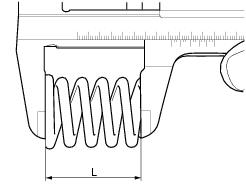
Measure the length "l" of each spring (3).
Minimum length: 41 mm.
Renew any springs that are shorter than the above limit value.
 Removal of the clutch
Note
For clarity, the figures show the engine removed from the frame.
Undo the fixing screws (1) and remove the ring (2) and the springs (3) from
the pressure plate (4).
Slide the pre ...
 Reassembling the clutch
Position the spacer (13).
Fit the flat ring (11) and the belleville washer (10) on the clutch center
(12), so that the convex side faces the clutch
drum.
Locate the belleville washer (8). ...
Other materials:
Reassembling the front footrest brackets
To remove the front rh footrest bracket (6) it is necessary to remove the
rear brake master cylinder reservoir (by leaving
it connected to the braking system), and the rear brake lever from the bracket
(sect. 7 - 4, Removing of the rear brake
control).
To remove the front rh footrest bracke ...
Menu 2 on/off function
This function turns off and back on the menu 2.
If menu 2 is disabled, the functions for average fuel consumption (cons.Avg),
instantaneous fuel consumption (cons.),
Average speed (speed avg), trip time (trip time) and air temperature (air) will
no longer be displayed in the "main
screen". ...
Water pump
Screw
Washer
Circlip
Water pump outlet union
Bearing
bearing
Spacer
Aluminium gasket
Mechanical seal
Water pump impeller
Bush
Water pump cover assembly
Screw
Plug
Sealing washer
Generator cover
Special washer
Fuel filler flange
Spare parts catalogue
Diave ...