
Ducati Diavel Owners Manual: Checking engine oil level
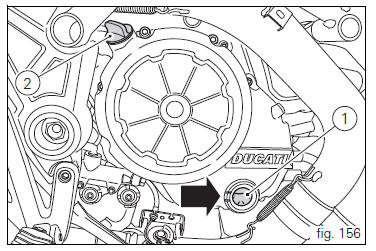
Check the engine oil level through the sight glass (1) on the clutch cover. When checking oil level, the motorcycle should be perfectly upright and the engine cold. The oil level should be between the two marks next to the sight glass. If level is low, top up with shell advance ultra 4 engine oil. Remove the filler plug (2) and top up to correct level. Replace the filler cap.
 Important
Engine oil and oil filters must be changed by a ducati dealer or authorised service centre at the intervals specified in the scheduled maintenance table reported in the warranty booklet.
Viscosity
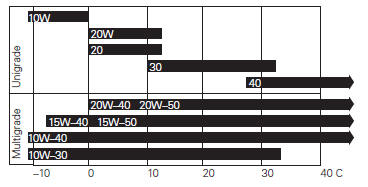
Sae 15w-50
The other viscosity values shown in the table can be used if the local average temperature falls within the limits specified for that oil viscosity.
 Tubeless tyres
Front tyre pressure:
2.50 Bar (rider only) - 2.6 Bar (with passenger and/or bags)
rear tyre pressure:
2.50 Bar (rider only) - 2.6 Bar (with passenger and/or bags)
as tyre pressures are affected by ...
 Cleaning and replacing the spark plugs
Spark plugs are essential to smooth engine running and
should be checked at regular intervals.
The condition of the spark plugs provides a good indication of
how well the engine is running.
Ha ...
Other materials:
Battery voltage indicator (battery)
This function describes the battery voltage indicator.
To access the function it is necessary to view the ""setting" menu", using
buttons (1) "s" or (2) "t" select the "battery"
function and press the reset button (3) to confirm.
The information will be displayed as follows:
if battery vol ...
Indicator cons. Avg - average fuel consumption
This function indicates the "average" fuel consumption.
The calculation is made considering the quantity of fuel used and
the km travelled since the last trip 1 reset. When trip 1 is reset,
the value is set to zero and the first available value is shown on
the display 10 seconds afte ...
Introduction to the "hands free" system
The hands free system allows the rider to start the engine without physically
using the ignition key. The ignition key
merely has to be in the vicinity of the motorcycle, such as in the rider's
pocket, for example, in order to use the vehicle.
Compared to the standard ignition switches the h ...