
Ducati Diavel Service Manual: Clutch cover
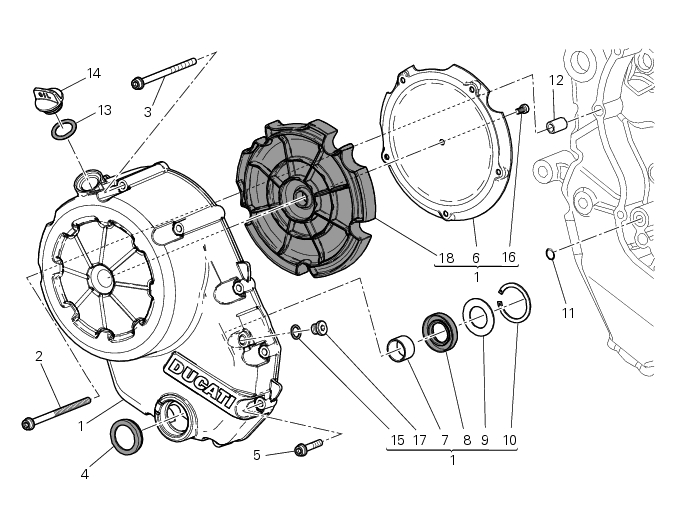
- Clutch-side crankcase cover
- Screw
- Screw
- Oil level sight glass
- Screw
- Plate
- Bush
- Sealing ring
- Shim washer
- Circlip
- O-ring
- Locating bush
- O-ring
- Plug
- Sealing washer
- Screw
- Plug
- Panel
Spare parts catalogue
Diavel abs clutch-side crankcase cover
Diavel carbon abs clutch-side crankcase cover
Important
Bold reference numbers in this section identify parts not shown in the figures alongside the text, but which can be found in the exploded view diagram.
- Removal of the clutch-side crankcase cover
- Disassembly of the clutch cover
- Reassembly of the clutch-side crankcase cover
- Refitting the clutch-side crankcase cover
 Reassembling the clutch
Position the spacer (13).
Fit the flat ring (11) and the belleville washer (10) on the clutch center
(12), so that the convex side faces the clutch
drum.
Locate the belleville washer (8). ...
 Removal of the clutch-side crankcase cover
Unscrew the screws (2), (3) and (5) securing the clutch-side crankcase cover
(1).
Tap around the edge of the cover with a plastic mallet to detach it from the
crankcase half.
Remove th ...
Other materials:
Injectors
Introduction
The injectors used on the diavel are top feed units, meaning that fuel is fed
into the top of the injector itself. The
injectors contain a winding which raises a needle when electrically energised.
This opens the atomiser nozzle, through
which pressurised fuel is dispensed, gener ...
Seat
Seat
Seat cover
Rubber mounting
Special screw
Plate
Latch
Spare parts catalogue
Diavel abs seat
Diavel carbon
abs
seat
Important
Bold reference numbers in this section identify parts not shown in the
figures alongside the text, but which can be found in
the exploded view ...
Dashes shown instead of speed indication or indicated speed is incorrect
Fault codes
Dds: speed sensor diagnosis -> max. Speed (max. Speed error - signal not
correct) - minimum speed (min speed error -
signal not correct) - congruence (correlation speed error - signal not correct).
Dashboard: the error "speed sensor" is shown on the service display. The eobd
...