
Ducati Diavel Service Manual: Dashboard
Note
The dashboard is supplied as a single component; its internal components cannot be renewed separately.
Important
Whenever the dashboard is renewed, the ignition key programming procedure must be repeated.
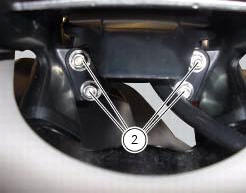
Loosen the nuts (2) to remove the master dashboard (1) from its seat and disconnect the connector (a) of the main wiring.
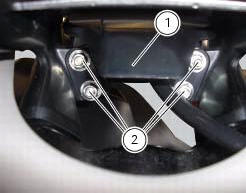
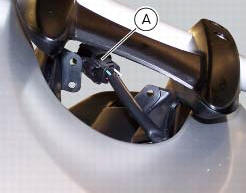
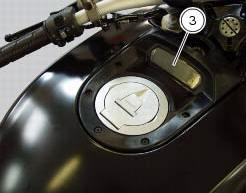
To remove the slave dashboard (3) remove the front tank fairing as indicated in sect. 5 - 2, "Removal of the fuel tank fairings".
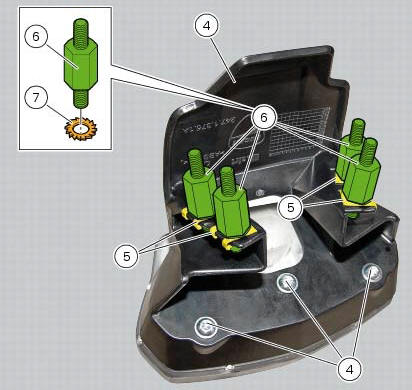
Refitting is the reverse of removal; be sure to check that the dashboard is mounted on its support with the screws (4) tightened to a torque of 3 nm +/- 10% (sect. 3 - 3, Frame torque settings).
Check the presence of clips (5) and stud bolts (6) with washers (7). The stud bolts (6) must be tightened to a torque of 2 nm +/- 10% (sect. 3 - 3, Frame torque settings).
Tighten the nuts (2) to a torque of 3 nm +/-10% (sect. 3 - 3, Frame torque settings).
 Instruments
...
 Dashboard system
The vehicle is equipped with two dashboards: an lcd (1) located on the
handlebar containing the key indications (speed,
rpm, engine coolant temperature, and clock) and a tft colour display (2) loca ...
Other materials:
The battery charging circuit and power distribution
On the diavel, the +15v (key on power) voltage does not come from a
conventional ignition key, but from pin 30 of the
hands free relay. This relay is switched to closed state by the hands free unit
when the latter enables power on for the
ignition and engine. The hands free relay receives +30v ...
Ignition coils
Introduction
The engine control system of the diavel includes two ignition coils: one for
the horizontal cylinder and one for the vertical
cylinder. These coils are installed directly in the spark plug wells. A diode is
installed on the secondary winding inside the
coil, which prevents the un ...
Removal of the gear selector lever
Unscrew and remove the fixing screws (18) and (20) of the complete gear
selector lever (21) and collect the spacer (19).
Remove the gearchange mechanism complete with the shaft, spring, and stop plate.
Important
Visually inspect the gear selector claw (14) for wear, particularly aroun ...