
Ducati Diavel Owners Manual: Digital rpm indication function
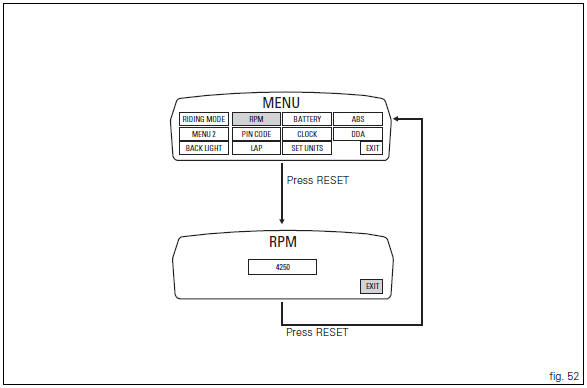
This function displays the number of rpms for improved accuracy when setting idle rpm.
To access the function it is necessary to view the "setting" menu page 48, using
button (1, fig. 14) ?"
" or (2, fig. 14) ?" " select the "rpm" function and
press the reset button
(12, fig. 12) To confirm.
The display shows the numerical value of the rpm with a precision of 50 rpm.
To exit the setting function, press the reset button (12, fig.
12) Where "exit" is highlighted.
 Backlighting setting function for the instrument panel on Handlebar -
dashboard 2
Backlighting setting function for the instrument panel on Handlebar -
dashboard 2
This function allows backlighting setting of the instrument
panel on handlebar.
To access the function it is necessary to view the "setting" menu page 48, using
button (1, fig. 14) ?&q ...
 Lap activation/deactivation function (lap time)
This function activates and deactivates the lap function (lap
time).
To access the function it is necessary to view the "setting" menu page 48, using
button (1, fig. 14) ?"
&quo ...
Other materials:
Distance travelled on fuel reserve: trip fuel
This function shows the distance travelled on fuel reserve (in km or miles
depending on the specific application).
When the fuel light comes on, the display automatically switches to the "trip
fuel" indicator.
Trip fuel reading remains stored even after key-off until the vehicle is
refue ...
Refitting the intake manifold and coolant union
Apply prescribed threadlocker to the fitting (12), start it with seal (24)
and tighten it to a torque of 2.5 Nm (min. 2 Nm -
max. 3 Nm) (sect. 3 - 3, Frame torque settings).
Install the pipe (b) and tighten the clamp (a) to the torque of 1 nm +/- 10%
(sect. 3 - 3, Engine torque settings).
...
Using a multimeter to check the electrical systems
Introduction
This instrument allows you to measure resistance, voltages, and current
values. Multimeters can be divided into two basic
types: analogue and digital display multimeter. An analogue multimeter has a
pointer display. The dial is marked with the
scales to be used for measurement of ...