
Ducati Diavel Service Manual: Disassembly of structural components and the frame
Before carrying out dimensional checks on the frame, you must remove all the superstructures fitted, referring to the removal procedures outlined in the sections of this manual.
The rear subframes (2) and (3) are structural components of the frame (1).
Both serve to support motorcycle superstructures and must therefore be in perfect condition.
The following flow chart illustrates the logical sequence in which the parts are to be removed from the motorcycle and a reference to the section where the removal procedure is described.
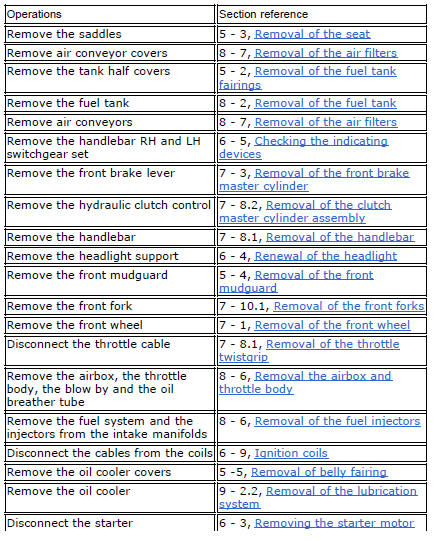
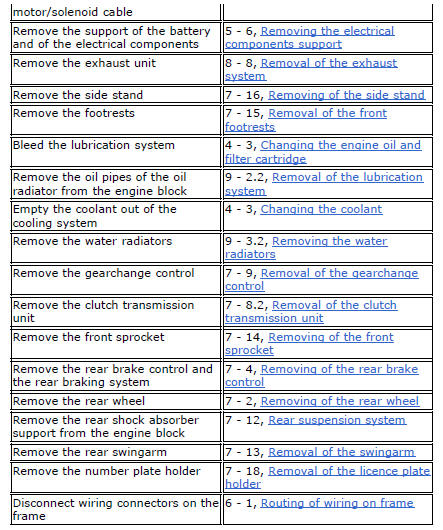
Refitting is the reverse of removal.
 Frame inspection
Frame
Rh subframe
Lh subframe
Grub screw
Nut
Special screw
Rubber pad
Nut
Special screw
Screw
Left-hand bracket
Hose clip
Hose clip
Right-hand bracket
Special screw
...
 Removal of the tool tray
To remove the tool tray unit from the lateral footrests, loosen the screws
(40) and remove the splashguard (20).
Undo the screws (15) and remove the cover (16).
Move the wiring branch ...
Other materials:
Evaporative emissions canister
Sealing washer
Union
Hose clip
Hose
Clamp
"T" fitting
Hose
Support
Special screw
Rubber mounting
Hose
Hose clip
Evaporative emissions canister
Hose
Spring
Spare parts catalogue
Diavel abs evaporative emissions canister
Diavel carbon
abs
evaporative emissions ...
Removal of the starter motor idler gear
Slide the gear pin (21) complete with the gear (19) and washer (20).
Warning
Pay attention to the washer (20) since it may fall inside the
crankcase half.
At this point, it is possible to remove the starter motor as described in
sect. 6 - 3, Starter motor. ...
Refitting the rear brake calliper
When replacing the brake pipes (33) or removing one of the rear braking
system components, pay special attention to the
position of the couplings on the pump and the calliper.
Warning
If incorrectly positioned, the hose can affect brake operation and
foul moving parts. Position the hose as sh ...