
Ducati Diavel Service Manual: Dtc (ducati traction control) setting function
This function allows you to customise the level of dtc intervention (ducati traction control) or disable it for every riding mode.
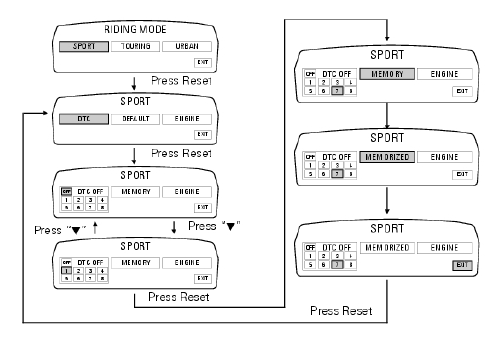
To access the function it is necessary to view the ""setting" menu", using buttons (1) "s" or (2) "t" select the "riding mode" function and press the reset button (3) to enter the following page. Use button (1) "s" or (2) "s" to select the riding style to change and press the reset button (3).
To go to next page use button (1) "s" or (2) "s" to select the "dtc" indication and press the reset button again (3) to confirm selection.
When accessing the function, the currently set dtc level appears at the left-hand side of the display, inside a rectangle (ex.: Dtc 1). Use button (1) "s" or (2) "s" to select the new intervention level (1 to 8) or off to disable the traction control; after selecting the new setting, press the reset button (3) to highlight "memory" indication. At this point, store the new setting by pressing and holding the reset button (3) for 3 seconds with "memory" displayed. If the setting has been stored successfully, the display will show "memorized" in green for 2 seconds and the exit option will be highlighted automatically.
To exit the setting function, press the reset button (3) when "exit" is highlighted.
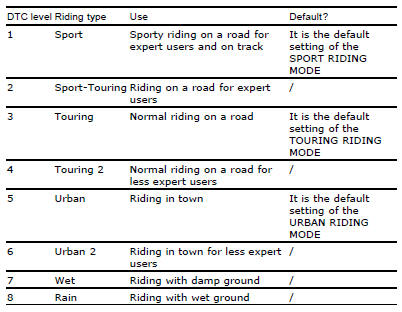
The dtc intervention increases, passing from level 1 to level 8.
The following table indicates the most suitable level of dtc intervention for
the various riding types as well as the default
settings in the "riding mode" that can be selected by the rider:
 Riding mode customisation
This function customises each riding style.
To access the function it is necessary to view the ""setting" menu", using
buttons (1) "s" or (2) "t" select the "riding
mode" function and press the ...
 Tips on how to select the sensitivity level
Warning
The 8 level settings of the dtc were calibrated using tyres of the
same make, model and size as those originally fitted to
the motorcycle.
The use of tyres of different size to the orig ...
Other materials:
Lap registration function
This function describes the "lap" time registration.
If the function is activated (see "lap activation/deactivation description), the
lap time can be registered as follows:
pressing the flash headlight button (6) the first time starts the "lap timer"
for the first lap, and the dashboard show ...
Stop light not working
Fault codes
Dds: stop light diagnosis -> stop light error (generic stop light malfunction
indication).
Dashboard: the error "stop light" is shown on the service display. The eobd
warning light activates.
Wiring diagram
Db dashboard connection, bbs bbs unit connection, a front brake ...
Absolute pressure sensors
Introduction
The engine control system of the diavel is equipped with two absolute
pressure sensors, with one connected to the intake
duct of each cylinder (map 1 cylinder 1 - horizontal - map 2 cylinder 2 -
vertical). They are used by the control unit to
determine the quantity of fuel to be ...