
Ducati Diavel Owners Manual: Engaged gear indicator
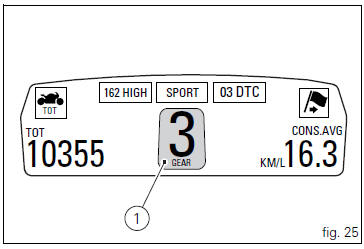
This function displays the gears (1, fig. 25).
The instrument panel receives information and indicates the engaged gear or "n" for neutral.
 Note
Note
In the case of a gear sensor "error", a dash "-" (not flashing) will be displayed.
 Indicator air - air temperature
This function shows the external temperature.
Display limits: -39C ÷ +124C
In the event of a sensor fault (-40C,+125C or
disconnected), a string of dashes "- - -" (not flashing) is ...
 Riding mode set indication
This function indicates the "riding style" set for the vehicle.
Three "riding modes" are available: sport, touring and
urban.
Each riding mode can be changed using the " ...
Other materials:
Limitations
This emission control system warranty shall not cover any
of the following:
Repair or replacement required as a result of
Accident,
Misuse,
Repairs improperly performed or replacements improperly
installed,
Use of replacement parts or accessories not conforming
to ducati specifi ...
Engine temperature sensor
Introduction
The engine control system on the diavel uses a sensor that measures the
temperature of the coolant (engine
temperature). This sensor has a resistance of ntc type (negative temperature
coefficient), that reduces its own value
when the temperature increases. The engine temperature ...
Refitting the crankshaft/connecting rod assembly
Install the connecting rod assembly (6) and (2) in the crankcase, carry out
the shimming and crankcase half reassembly
procedure as described in sect. 9 - 9.2, Reassembly of the crankcase halves.
Important
Make sure that the connecting rods (2) are correctly positioned in the
cylinders. Incor ...