
Ducati Diavel Service Manual: Engine rpm indicator (rpm)
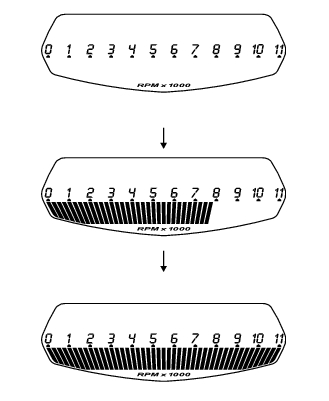
This function displays the rpms.
The dashboard receives the engine rpm information and displays it.
This information is displayed progressively from the left to the right, identifying the rpms.
 Vehicle speed indicator
This function displays vehicle speed (km/h or mph depending on the set
measurement system).
The dashboard receives information about the actual speed and displays the
number increased by 5%.
...
 Clock
Clock
This function shows the time.
Time is always displayed as follows:
am from 0:00 to 11:59
Pm from 12:00 to 11:59
If battery power is suddenly cut off (batt-off), when battery power is
restored ...
Other materials:
Refitting the expansion tank
If the support (15) has been removed, place the hose clamps (14) on the
bracket (15) orienting them as indicated.
Fully press the pins (a) to block the clamps (14) until pins surfaces (b) are at
the same level of the clamps (14) surfaces.
Apply recommended threadlocker to the thread of the ...
Low hands free key (hf) battery level
The activation of this (amber yellow) "warning" indicates that the hands free
system has detected that the battery that
permits the active key (a) to communicate and turn the vehicle on is almost
discharged.
Note
In this case replace as soon as possible the battery as indicated in sect.
6 - ...
Removal of the front footrests
Note
The removal of the front footrests is described only for the right one (2)
but it is the same also for the left one.
Remove the circlip (5) by releasing the pin (3).
Slide the pin (3) off the frame by supporting the footrest (2).
Slide off the footrest (2) from its seat and collect th ...