
Ducati Diavel Service Manual: Engine setting function (engine power control)
This function customises engine power and output.
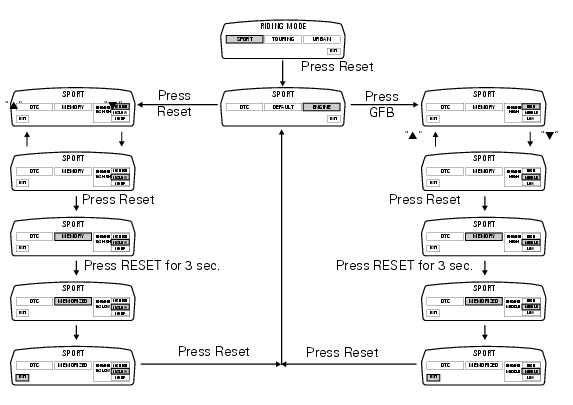
To access the function it is necessary to view the ""setting" menu", using buttons (1) "s" or (2) "t" select the "riding mode" function and press the reset button (3) to enter the following page.
Use button (1) "s" or (2) "t" to select the riding mode to be changed and press the reset button (3) to access the next page; use button (1) "s" or (2) "t" to select the "engine" indication and press the reset button again (3) to confirm selection.
When accessing the function, the engine setting (engine 162 high, 162 low o 100 hp) appears at the right-hand side of the display, inside a rectangle.
Note
In japan and france versions, the display displays the settings (engine high, middle or low).
Using button (1) "s" or (2) "t" select one of the three available engine settings; after selecting the new setting, press the reset button (3) to highlight "memory" indication.
At this point, store the new setting by pressing and holding the reset button (3) for 3 seconds with "memory" displayed.
If the setting has been stored successfully, the display will show "memorized" in green for 2 seconds and the exit option will be highlighted automatically.
To exit the setting function, press the reset button (3) when "exit" is highlighted.
 Tips on how to select the sensitivity level
Warning
The 8 level settings of the dtc were calibrated using tyres of the
same make, model and size as those originally fitted to
the motorcycle.
The use of tyres of different size to the orig ...
 Default function (resetting ducati default parameters)
This function resets the parameters set by ducati for each riding style.
To access the function it is necessary to view the ""setting" menu", using
buttons (1) "s" or (2) "t" select the "riding
...
Other materials:
Useful information for safe riding
Warning
Read this section before riding your motorcycle.
Many accidents are the result of the inexperience of the
rider. Always make sure you have your licence with you; you
need a valid licence that entitles you to ride a motorcycle.
Do not lend your motorcycle to persons who are
inexperie ...
Frame inspection
Frame
Rh subframe
Lh subframe
Grub screw
Nut
Special screw
Rubber pad
Nut
Special screw
Screw
Left-hand bracket
Hose clip
Hose clip
Right-hand bracket
Special screw
Cover
Handgrab
Slider
Reflector (rear)
Splashguard
Pin
Clip nut
Tool tray
Screw
...
Removal of the licence plate holder
Disconnect connector (5) of the number plate holder wiring from the main one.
Release the number plate holder light cable from the ties and the cable grommets
as indicated in sect- 7 - 6, flexible
wiring/hoses positioning, since the cable is together with the rear abs sensor
cable.
...