
Ducati Diavel Owners Manual: Front brake lever
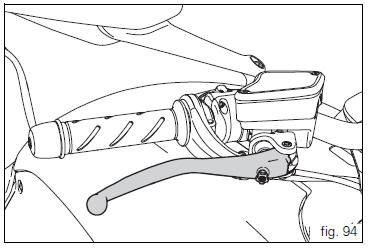
Pull the lever (1, fig. 94) Towards the twistgrip to operate the front brake. The system is hydraulically assisted and you only need to pull the lever gently.
The control lever (1, fig. 94) Features a dial adjuster (2, fig. 94) For lever distance from the twistgrip on handlebar adjustment.
The lever distance can be adjusted through 10 clicks of the dial (2, fig. 94). Turn clockwise to increase lever distance from the twistgrip. Turn the adjuster counter clockwise to decrease lever distance.
 Throttle twistgrip
The twistgrip (1, fig. 93) On the right handlebar opens the
throttles. When released, it will spring back to the initial
position (idling speed).
...
 Rear brake pedal
Push down the pedal (1, fig. 95) To operate the rear brake.
The system is hydraulically controlled.
...
Other materials:
Gearbox shafts
Shim, thickness 1
Gearbox primary shaft
Shim, thickness 0.5
Needle roller bearing
5Th speed driving gear
Splined washer, thickness 0.5
Circlip
3Rd- 4th speed driving gear
6Th speed driving gear
2Nd speed driving gear
Shim, thickness 1.8
Splined washer, thickness 0.5
Sp ...
Removal of the timing belt covers
Loosen the screws (4) securing the central external cover (1) and remove it
from the central side.
Undo the fixing screws (4) of the external cover (25) and remove it from the
vertical thermal unit.
Undo the fixing screws (4) of the external cover (3) and remove it from the
horizonta ...
Air intake
Air filter
Right air duct
Screw
Air temperature sensor
Screw
Left air duct
Sealing washer
Threaded insert
Spacer
Clamp
Breather hose
Spare parts catalogue
Diavel abs air intake - oil breather
Diavel carbon
abs
air intake - oil breather
Important
Bold reference num ...