
Ducati Diavel Service Manual: Front wheel
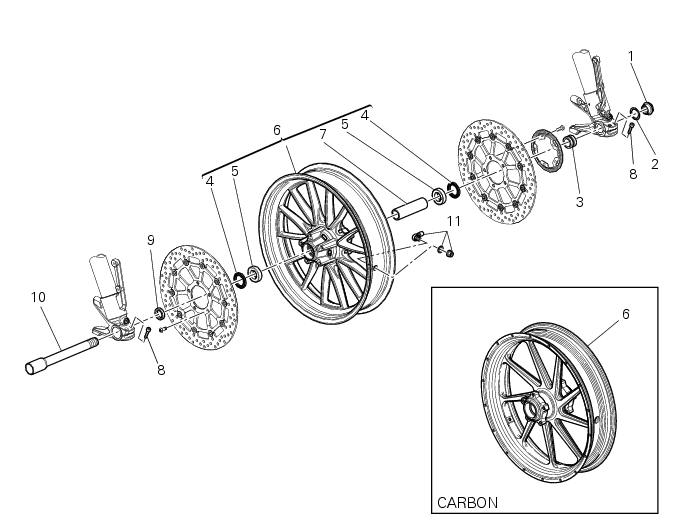
- Nut
- Washer
- Left spacer
- Sealing ring
- Bearing
- Front wheel rim
- Inner spacer
- Screw
- Right spacer
- Front wheel shaft
- Valve
Spare parts catalogue
Diavel abs front and rear wheels
Diavel carbon abs front and rear wheels
Important
Bold reference numbers in this section identify parts not shown in the figures alongside the text, but which can be found in the exploded view diagram.
 Chassis
...
 Removal of the front wheel
Support the bike so that the front wheel is raised from the ground.
Remove the front brake calliper (b) by unscrewing the two screws (a) securing
the calliper to the fork leg; do not
disconnect ...
Other materials:
Dtc (ducati traction control) setting function
This function allows you to customise the level of dtc
intervention (ducati traction control) or disable it for every
riding mode.
To access the function it is necessary to view the "setting" menu page 48, using
button (1, fig. 14) ?"" or (2, fig.
14) ?" " sele ...
Reassembly of the crankcase halves
If removed, apply threadlocker on the screw (36), insert it with the washer
(37) on the crankcase half and tighten it to The torque of 8 nm
(min. 7 Nm - max. 9 Nm) (sect. 3 - 3, Engine torque settings).
If removed, apply threadlocker on the dowel thread (35), tighten it to a
torque of 20 ...
Digital rpm indication function
This function displays the number of rpms for improved
accuracy when setting idle rpm.
To access the function it is necessary to view the "setting" menu page 48, using
button (1, fig. 14) ?"
" or (2, fig. 14) ?" " select the "rpm" function and
press ...