
Ducati Diavel Owners Manual: Hands free system
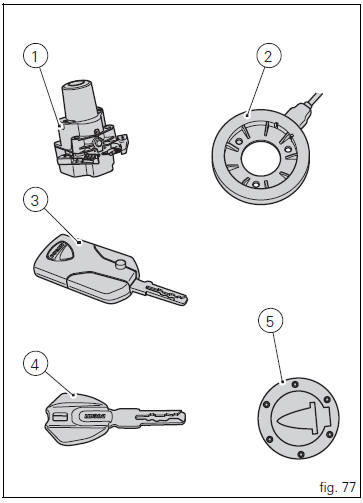
The hands free system consists of:
- Hands free lock;
- Antenna;
- Active key;
- Passive key;
- Electric cap (optional).
The "hands free" button (7, fig. 79) Is located on tank front end.
- Hands free system key-on and key-off
- Key-on/key-off using the red key on the handlebar with the active key
- Key-on/key-off using the key on the hands free lock with the active key
- Key-on/key-off using the red key on the handlebar with the passive key
- Key-on/key-off using the key on the hands free lock with the passive key
- Key-on/key-off using the pin code (immobilizer release)
- Entering pin code function for vehicle release
 Position of motorcycle controls
Instrument panel on handlebar.
"Hands free" system.
Instrument panel on tank.
Left-hand handlebar switch.
Clutch lever.
Rear brake pedal.
Right-hand handlebar switch.
Th ...
 Hands free system key-on and key-off
Key-on consists in turning on the hands free system and all
of its electronic devices.
Key-off consists in turning off the hands free system and all
electronic devices, and makes sure the engine ...
Other materials:
Clock setting function
This function sets the clock.
To access the function it is necessary to view the ""setting" menu", using
buttons (1) "s" or (2) "t" select the "clock"
function and press the reset button (3) to confirm.
In the following screen the message "setting" is highlighted in green (4); now,
press ...
Reporting of safety defects
If you believe that your vehicle has a defect which could
cause a crash or could cause injury or death, you should
immediately inform the national highway traffic safety
administration (nhtsa) in addition to notifying ducati north
america. If nhtsa receives similar complaints, it may open
an in ...
Removal of the front brake master cylinder
Warning
The brake master cylinder manufacturer advises against servicing the
brake master cylinder due to the safety critical
nature of this component. Incorrect overhaul of these critical safety components
can endanger rider and passenger safety.
Maintenance operations on these units are l ...