
Ducati Diavel Service Manual: High beam flash not working - start/stop lap function not working
Fault codes
Dds: no fault code displayed.
Dashboard: no fault code displayed.
Wiring diagram
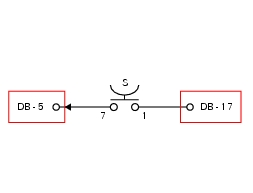
Db dashboard connection, s high beam flash button. 7 Orange - o, 1 red/blue - r/b.
Location of connections and components
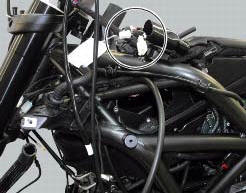
Location of left hand handlebar switchgear set connection.
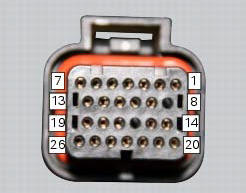
Pin numbering for wiring harness side dashboard connector.
 Turn indicators not working
Fault codes
Dds: no fault code displayed.
Dashboard: no fault code displayed.
Wiring diagram
Db dashboard connection, bbs bbs unit connection, s turn indicator button, f1
front left turn i ...
 Number plate light not working
Fault codes
Dds: no fault code displayed.
Dashboard: no fault code displayed.
Location of connections and components
Location of rear turn indicator and number plate light connection.
p ...
Other materials:
Indicator air - air temperature
This function shows the external temperature.
Display limits: -39C ÷ +124C
In the event of a sensor fault (-40C,+125C or
disconnected), a string of dashes "- - -" (not flashing) is
displayed and the "engine/vehicle diagnosis - eobd" light
(7, fig. 4) Comes on.
N ...
Passive key
Introduction
The passive key (1) is used when the active key is not working correctly or
is not available.
The passive key works as a transponder, and must therefore be placed physically
onto the antenna to work.
The mechanical part (2) of the key is used to open the seat or the tank plug ...
Setting menu
This menu is used to enable/disable and set some motorcycle functions.
To access the "setting menu" press and hold button (2) "t" for 3 seconds.
Note
When within this menu no other function can be displayed.
Important
For safety reasons, the setting menu can only be accessed when motorcycle
...