
Ducati Diavel Owners Manual: Indicator cons. - Instantaneous fuel consumption
This function indicates the "instantaneous" fuel consumption.
The calculation is made considering the quantity of fuel used and the distance travelled during the last second. The datum is expressed in "l/100" (litres / 100 km); it is possible to change the units of measurement for "consumption" (both average and instantaneous together) from l/100 to km/l through the "set units" function of the setting menu.
The active calculation phase only occurs when the engine is running and the vehicle is moving (moments when the vehicle is not moving when speed is equal to 0 and/or when the engine is off are not considered). Dashes "- -.-". Are shown on the display when the calculation is not made.
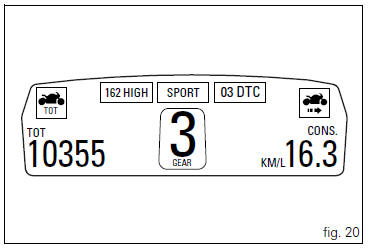
 Indicator cons. Avg - average fuel consumption
This function indicates the "average" fuel consumption.
The calculation is made considering the quantity of fuel used and
the km travelled since the last trip 1 reset. When trip 1 is res ...
 Indicator speed avg - average speed
This function shows the average speed of the motorcycle.
The calculation is made considering the distance and time
travelled since the last trip 1 reset. When trip 1 is reset, the
value is set to ...
Other materials:
Removal of the rear wheel eccentric hub and rear wheel shaft
Before removing the eccentric hub, you must first remove the parts listed
below.
Slacken off the screws (34).
Remove the spacer (20) and the inner ring (21) on the chain side and remove the
wheel shaft (31) with the brake disc
(30) from the opposite side.
Remove the circlip (19 ...
Residual range indication when the service is due
After resetting the first oil service warning (triggered at
1000 km), upon every key-on the system displays the
indication of which type of service should be performed next
(oil service or desmo service) and the residual range.
A (green) warning (1, fig. 32) Is activated for 2 seconds on
ever ...
General maintenance indications
Useful tips
Ducati recommends that you follow the instructions below in order to prevent
problems and obtain the best end result:
When diagnosing faults, primary consideration should always be given to
what the customer reports about motorcycle
operation since this information can highli ...