
Ducati Diavel Owners Manual: Instrument panel on tank
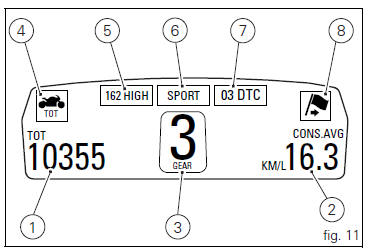
- Menu 1 (tot, trip1, trip2, trip fuel).
- Menu 2 (cons.Avg., Cons., Speed avg, air and trip time) if active.
- Gear / neutral indication.
- Icon referred to the function below from menu 1.
- Indication of engine setting for the currently set riding style.
- Currently set riding style (riding mode).
- Indication of the intervention level of the dtc (traction control) for the currently set riding style.
- Icon referred to the function below from menu 2.
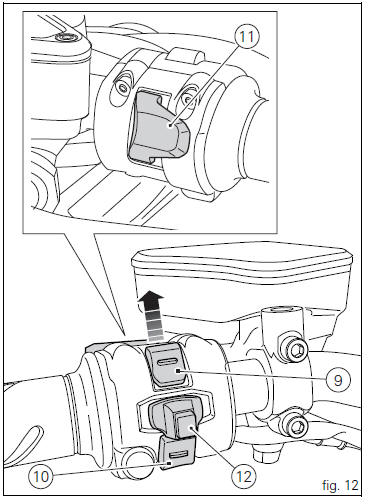
- Control button (fig. 12).
Button used to display and set instrument panel parameters
with the position  .
.
- Control switch (fig. 12).
Button used to display and set instrument panel parameters
with the position  .
.
- High-beam flasher button flash (fig. 12).
The high-beam flash button may also be used to for lap functions.
- Reset button (fig. 12).
The turn indicators off button may also be used for the reset/confirm function on the instrument panel and for activating the "riding style".
 Display background colour (automatic adjustment)
Instrument panel background colour is set automatically
according to exterior lighting conditions.
When sensor detects "poor lighting" (night), it switches to
black background mode; vic ...
 Tft - parameter setting/display
Warning
Any adjustments to the instrument panel must only be
carried out when the motorcycle is stationary. Never operate
the instrument panel controls while riding the motorcycle.
At the end of ...
Other materials:
Air temperature sensor
Introduction
The engine control system on the diavel uses a sensor that measures air
temperature. This sensor has a resistance of
ntc type (negative temperature coefficient), that reduces its own value when the
temperature increases. The air
temperature sensor allows the engine control unit t ...
Replacing the battery in the active key
Only use 3 volt cr 2032 lithium ion batteries.
Note
The keys do not need to be reprogrammed after
replacing the battery.
Remove the metal part of the battery.
Use a large sized coin to pry open the shells of the plastic grip
(2? coin) as shown in fig. 65.
Important
Insert the coil on ...
Removal of the fuel tank fairings
Remove the rh air inlet (7) by loosening screws (6) and (9).
Undo the retaining screw (3) of the rh front half-fairing (1).
Slightly pull the pin (a) to disengage it from the seal (b), and remove the
rh front half-fairing (1) by sliding it onwards
and releasing the tabs (c) from the ...