
Ducati Diavel Owners Manual: Lap activation/deactivation function (lap time)
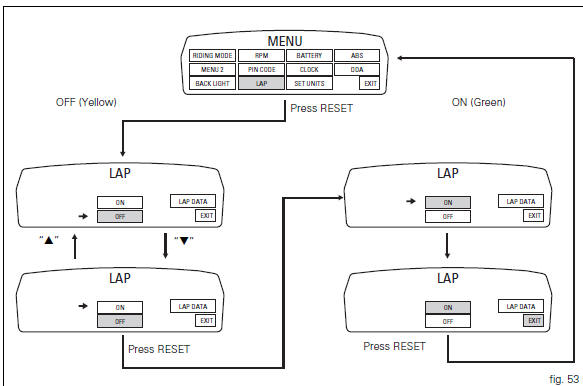
This function activates and deactivates the lap function (lap time).
To access the function it is necessary to view the "setting" menu page 48, using
button (1, fig. 14) ?"
" or (2, fig. 14) ?" " select the "lap" function and
press the reset button
(12, fig. 12) To go to next page.
Function state is highlighted on the display (on in green or off in yellow); use
button (1, fig. 14) ?"
" or (2, fig. 14) ?" "
"
to shift the arrow on the left onto the new setting and
confirm by pressing the reset button (12, fig. 12).
To exit the setting function, press the reset button (12, fig.
12) Where "exit" is highlighted.
Storing the "off" condition disables the lap function.
Storing the "on" condition enables the lap function (see "lap registration" paragraph).
 Note
Note
When the "lap" function is active, the flash button (11, fig. 12) Takes on the dual function of high beam headlight "flash" and lap time start / stop.
 Digital rpm indication function
This function displays the number of rpms for improved
accuracy when setting idle rpm.
To access the function it is necessary to view the "setting" menu page 48, using
button (1, fig. ...
 Lap registration function
This function describes the "lap" time registration.
If the function is activated (see "lap activation/deactivation
description), the lap time can be registered as follows:
Pres ...
Other materials:
Replacing the front phonic wheel sensor
Disconnect the front abs sensor (2) connector (a) from the main electric
wiring.
Open all the retainer clamps of the front abs sensor cable (2): refer to table
of sect. 7 - 6, Flexible wiring/hoses
positioning.
Loosen retaining screw (1) and remove the front abs sensor (2) with
ca ...
Refitting the oil pump
If removed, apply specific threadlocker on the bushing (7) outer thread, and
screw it in the crankcase half, observing the
height.
Position the reference bushings (15) and the oil sealing o-rings (2) and (4)
according to the crankcase lubrication
channels.
Position the oil pump on th ...
Communication antenna
Introduction
The communication antenna enables the hands free system to detect and
communicate with the active or passive key.
The active key is detectable within a range of 1.5 Metres, whereas the passive
key (or active key with flat battery) can
only be detected if placed in contact with ...