
Ducati Diavel Owners Manual: Maintenance indicator
This function indicates that the vehicle is about to or has travelled a distance for which an authorised ducati service centre should be contacted to have the general maintenance or oil change performed.
Maintenance table
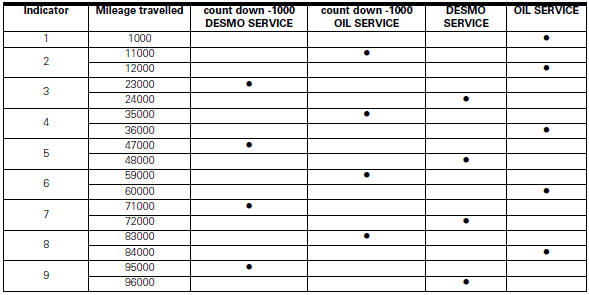
First warning - oil service 1000 km
The first warning is activated at 1000 km (600 miles) of odometer reading.
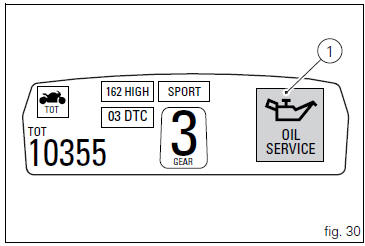
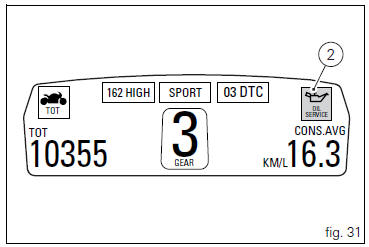
The (red) warning is activated as a large icon for 10 seconds upon every key-on (1, fig. 30) Then as a small warning that remains displayed (2, fig. 31) Until it is reset.
 Warning
This message can only be reset by the ducati dealer or authorised service centre that performs the maintenance.
 Riding style function (riding style change)
This function changes the motorcycle riding style.
Each riding style is associated with a different intervention
level of the traction control (dtc - ducati traction control)
and different engine ...
 Residual range indication when the service is due
After resetting the first oil service warning (triggered at
1000 km), upon every key-on the system displays the
indication of which type of service should be performed next
(oil service or desmo se ...
Other materials:
Communication antenna
Introduction
The communication antenna enables the hands free system to detect and
communicate with the active or passive key.
The active key is detectable within a range of 1.5 Metres, whereas the passive
key (or active key with flat battery) can
only be detected if placed in contact with ...
Removing the front footrest brackets
Note
The assembly of the front footrests is described only for the right one
(2) but it is the same also for the left one.
Place the spring (4) bringing the end (a) onto the footrest (2).
Place the footrest (2) in the correct position, by inserting the end (c) of the
spring (4) in the hole ...
Front brake control
Front brake master cylinder
Brake lever
Special screw
Sealing washer
Screw
Phonic wheel
Brake disc
Pin
Left brake calliper
Boot
Bleed valve
Spare stand
Control unit - front callipers pipe
Microswitch
Oil duct union
Screw
Hose clip
Right brake calliper
Speci ...