
Ducati Diavel Owners Manual: Position of motorcycle controls
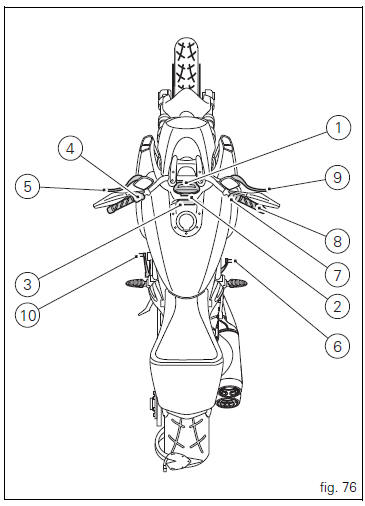
- Instrument panel on handlebar.
- "Hands free" system.
- Instrument panel on tank.
- Left-hand handlebar switch.
- Clutch lever.
- Rear brake pedal.
- Right-hand handlebar switch.
- Throttle twistgrip.
- Front brake lever.
- Gear change pedal.
 Controls
Warning
This section shows the position and function of the
controls used to ride the motorcycle. Be sure to read this
information carefully before you use the controls. ...
 Hands free system
The hands free system consists of:
Hands free lock;
Antenna;
Active key;
Passive key;
Electric cap (optional).
The "hands free" button (7, fig. 79) Is located on tank fron ...
Other materials:
Protective apparel
Always wear a helmet. Most motorcycle accident fatalities
are due to head injuries.
For safety eye protection, gloves, and high top, sturdy boots
should also be worn.
The exhaust system becomes very hot during operation,
never touch the exhaust system. Wear clothing that fully
covers your ...
Refitting the clutch master cylinder assembly
Insert the clutch master cylinder assembly (3) and the clamp (6) on the left
handlebar, so that the top mating faces
match the mark (z) on the handlebar as shown.
Couple terminal (6) to the clutch master cylinder control and fix them with
the screws (v).
Tighten the retaining screws ...
Stands
Side stand
Side stand switch
Screw
Plate
Screw
Inner spring
Outer spring
Nut
Rotation pivot
Screw
Screw
Screw
Nut
Clearance adjuster
Spare parts catalogue
Diavel abs stand
Diavel carbon
abs
stand
Important
Bold reference numbers in this section identify part ...