
Ducati Diavel Service Manual: Reassembly of the tool tray
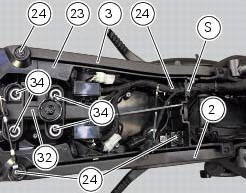
Place the tool tray unit (23) on the lateral brackets (2) and (3) by tightening the screws (24) to 14 nm +/- 5% (sect. 3-3, Frame torque settings).
If the handle guide (32) has been previously removed, position it on the tray (23) and tighten the screws (34) to 20 nm +/- 5% (sect. 3-3, Frame torque settings).
Reposition the wiring branch in the seat (s) in the tray (23).
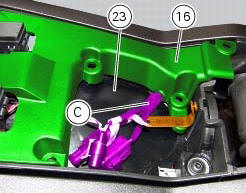
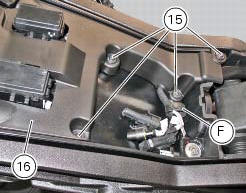
Place the gloves compartment cover (16) on gloves compartment (23), inserting wiring (c) into the suitable recess in the cover (16).
Warning
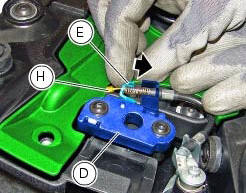
While positioning the cover (16) on the compartment (23), push bracket (e) of the lock latch (d) in the direction shown by the arrow, to prevent the lock wire terminal (h) from being squeezed under the cover.
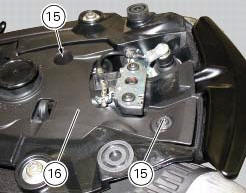
Check the presence of the clip (f) on the cover (16).
Fix the cover (16) by tightening the screws (15) to a torque of 4 nm +/- 10% (sect. 3 -3, Frame torque settings).
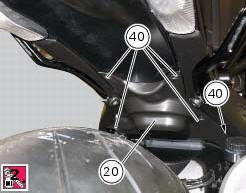
Apply the recommended threadlocker to the screws (40).
Reposition the splashguard (20) and tighten the screws (40) to a torque of 4 nm +/- 10% (sect. 3 -3, Frame torque settings).
 Reassembling the frame and the lateral footrests
Apply the recommended grease to the thread of the pins (9) and of the nuts
(8).
Place the frame (1) and the brackets (2) and (3) on the engine block. Start the
pins (9) by holding the nuts (8) ...
 Tail light - number plate holder
Rh tail light
Vibration damper mount
Spacer
Screw
Number plate light
Screw
Screw
Plate
Number plate holder
Nut
Screw
Rear chain guard
Lh tail light
Spring washer
Vib ...
Other materials:
Identification data
All ducati motorcycles have two identification numbers, for
frame (fig. 1) And engine (fig. 2).
Note
These numbers indicate the motorcycle model and
should be quoted when ordering spare parts.
...
Removing the electrical components support
Remove the following elements located inside the electrical components
support:
The battery fixing bracket (4) and the battery (14) as specified under
section 6 - 2, battery;
The voltage regulator (3) as specified under section 6 -
2,rectifier-regulator;
The solenoid starter (18) ...
Checking the idle speed
Check that the bike is provided with electronic control unit, oem intake and
exhaust systems, otherwise fit original
components.
Connect the inserts of the exhaust gas analyser code 88713.1010 To the outlets
on the exhaust pipes, using the fittings
(1).
Warning
Make sure that the thro ...