
Ducati Diavel Service Manual: Recovery in the event of flat active key battery
If the active key battery is running low or is flat, the hands free system shows the relative icon on the dashboard.
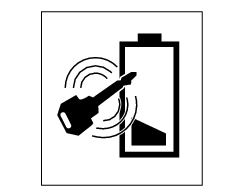
The following image shows the icon appearing on the circular area of the dashboard: this indicates that the active key battery is flat.
For the replacement procedure of the active key battery refer to paragraph "active key" - "replacing the battery in the active key" of this chapter.
The active key still works even if its battery is flat. In this case, however, it functions in exactly the same way as the passive key. During the dashboard switch on procedure, the key must be physically placed on the antenna. To reach the antenna remove the seat (sect. 5 - 3, "Removal of the seat").
Note
After the active battery key is replaced, the low battery icon may still be displayed the next time the dashboard is switched on. This icon will disappear after a few seconds.
 Recovery procedure with no key
When the dashboard is on and the key has been recognised, the hands free
attempts to detect the key every 60 seconds.
If the engine is off and the on/off switch on the handlebar is turned to "run ...
 Recovery procedure in the event of electric steering lock fault
If any fault occurs during activation of the electric steering lock: for
example, if the pin jams, if the handlebar is moved
while the pin is deployed or if there is excessive strain on the electri ...
Other materials:
Rear-view mirrors
Rear-view mirror
Screw
U-bolt
Spring washer
Spare parts catalogue
Diavel abs handlebar and controls
Diavel carbon
abs
handlebar and controls
Important
Bold reference numbers in this section identify parts not shown in the
figures alongside the text, but which can be found in
...
Refitting the exhaust system
Refit the heat guard on the manifold (10) by tightening the nuts (9) to a
torque of 10 nm +/- 10% (sect. 3 - 3, Frame
torque settings).
Position the vertical exhaust manifold (22) on the vertical cylinder head
with the gasket (23).
Tighten the fixing nuts (21) to a torque of 10 nm +/- 1 ...
Throttle valve position sensor
Introduction
The throttle valve position sensor (tps) of the diavel is mounted on the
throttle body.
The sensor is integrated into the throttle valve actuator motor, which
turns the spindle of the vertical cylinder throttle
valve directly.
The sensor sends information to the engine con ...