
Ducati Diavel Service Manual: Refitting the front sprocket
Grease the o-ring (16) and install it on the front sprocket spacer (15).
Fit the spacer, from the o-ring side, on the secondary shaft and drive it fully home against the inner ring of the bearing.
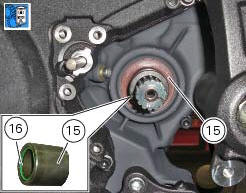
Check that the splines of the gearbox secondary shaft and the sprocket are in perfect condition.
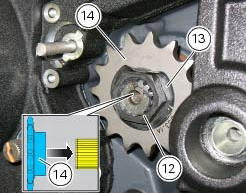
Fit the engine pinion (14) on the gearbox secondary shaft by orienting it as indicated. Install the safety washer (13).
Tighten the nut (12) to the torque of 186 nm +/- 5% (sect. 3 - 3, Frame torque settings).
Bend the washer (13).
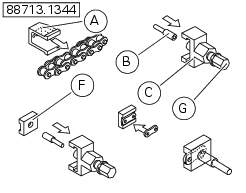
Fit the chain and close it using the tool with code 88713.1344 That was used to open the chain.
The tool is composed of a holder (a), punch (b), body (c) and two wrenches (d) and (e) and link plate holder (f).
Connect the two halves of the chain with the external link and manually fit the plate onto the pins.
Warning
Lubricate the pins abundantly; try to avoid touching them with your hands.
Fit the holder (a) onto the external link.
Fit the punch (b) into the body (c) and the plate holder (f).
Fit the body (c) onto the holder (a) which holds the chain in position.
Manually turn the bolt (g) until the plate holder (f) is seated against the plate itself.
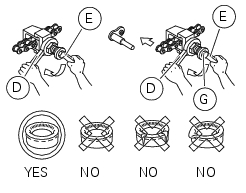
Use wrenches (d) and (e) to turn the bolt (g) clockwise until the chain pin is in contact with the holder (f).
Remove the holder (a) from the tool.
Manually turn the bolt (g) until the punch (b) locates against the pin, taking care that they are aligned with each other.
Use wrenches (d) and (e) to turn the bolt clockwise until the punch (b) is seated against the chain plate.
To complete reassembly, repeat the entire procedure with the second pin.
Warning
Carefully check the two pins: the figure shows the correct result of the procedure.
Adjust the chain tension (sect. 4 - 3, Adjusting the chain tension).
Apply the recommended threadlocker to the screws (11).
Fit the sprocket cover (10) tightening the screws (11) to the torque of 6 nm+/- 10% (sect. 3 - 3, Frame torque settings).
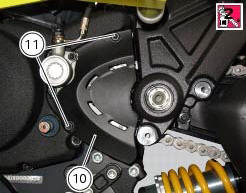
 Removing of the front sprocket
Undo the screws (11) and remove the chain cover (10).
Loosen the chain (sect. 4 - 3, Adjusting the chain tension).
Remove the chain with the tool code 88713.1344.
The tool is composed of a ...
 Replacing of the rear sprocket
Lock the wheel axle rotation.
Remove the clip (1).
Loosen the locking nut (2) with a socket wrench.
Fully unscrew the nut (2) and remove the washer (3) and the flange (5) with the
sproc ...
Other materials:
Residual range indication when the service is due
After resetting the first oil service warning (triggered at
1000 km), upon every key-on the system displays the
indication of which type of service should be performed next
(oil service or desmo service) and the residual range.
A (green) warning (1, fig. 32) Is activated for 2 seconds on
ever ...
Ignition coils
Introduction
The engine control system of the diavel includes two ignition coils: one for
the horizontal cylinder and one for the vertical
cylinder. These coils are installed directly in the spark plug wells. A diode is
installed on the secondary winding inside the
coil, which prevents the un ...
Low battery level
The activation of this (amber yellow) "warning" indicates
that the status of the battery vehicle is low.
It is activated when the battery voltage is . 11.0 Volt.
Note
In this case, ducati recommends charging the battery
as soon as possible with the specific device, as it is possibl ...