
Ducati Diavel Service Manual: Refitting the gearchange mechanism
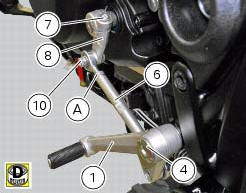
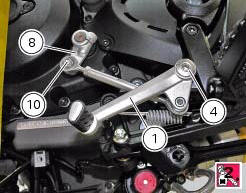
Make sure that the gearchange linkage assembly (6) is installed with the ball joint with a left-hand thread (a) facing the lever (8).
Apply the recommended grease to the non-threaded surface of the pin (4).
Fit the first o-ring (5) in the pin (4).
Start the pin (4) in the gearchange lever (1). Smear recommended grease on the second o-ring (5). Insert the second o Ring (5) and the washer (9).
Apply the recommended threadlocker to the threaded side of the pin (4). Fit the gearchange lever (1) on the footrest bracket and tighten the pin (4) to a torque of 23 nm +/- 10% (sect. 3 - 3, Frame torque settings).
Fit the lever (8) on the gearchange control assembly, and start the screw (10).
Tighten the screw (10) to the torque of 10 nm +/- 10% (sect. 3 - 3, Frame torque settings).
Fit the gear control unit inserting the lever (8) on the gear control pin, apply threadlocker on the screw (7) and insert it on the lever (8).
Tighten the screw (7) to a torque of 10 nm +/- 10% (sect. 3 - 3, Frame torque settings).
 Disassembly of the gearchange mechanism
Refer to the exploded view at the beginning of this section for indications
on disassembly and renewal of gearchange
components.
If the bushing (2) inside the pedal (1) needs replacing, grease t ...
 Fork
Fork
...
Other materials:
Removal of the fuel tank
On the usa version remove the canister filter as indicated in sect. 8 - 10,
"Removal of the evaporative emissions
canister".
Loosen and remove the front retaining screw (4)
Remove the flange cover (a) by loosening the screws (b), disconnect the
quick-release fittings (c) from the fl ...
Reassembling the front footrest brackets
To remove the front rh footrest bracket (6) it is necessary to remove the
rear brake master cylinder reservoir (by leaving
it connected to the braking system), and the rear brake lever from the bracket
(sect. 7 - 4, Removing of the rear brake
control).
To remove the front rh footrest bracke ...
Backlighting setting function for the dashboard on handlebar - dashboard 2
This function allows backlighting setting of the dashboard on handlebar.
To access the function it is necessary to view the ""setting" menu", using
buttons (1) "s" or (2) "t" select the "back
light" function and press the reset button (3) to enter the following page.
Use button (1) "s" or ( ...