
Ducati Diavel Service Manual: Refitting the handlebar
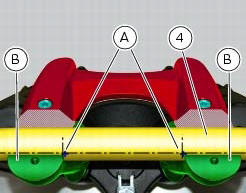
Position the handlebar (4) so that the external lower corner of the marks (a) on the handlebar matches the upper internal corner of the lower u-bolts (b) as shown.
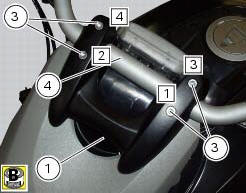
Apply the recommended grease to the threads and undersides of the heads of the screws (3).
Important
Position the upper u-bolt (1) as shown.
Refit the upper clamp (1) and insert the screws (3).
Tighten the screws (3) to a torque of 25 nm +/-5% (sect. 3 - 3, Frame torque settings), applying the sequence 1-2-3-4-3, as indicated in the figure.
Adjusting the throttle cable
To operate on the set screws of the throttle grip cables, consult sect. 4 - 3, Adjusting the throttle cable.
 Removal of the handlebar
Unscrew and remove the screws (3) securing the upper clamp (1).
Remove the upper clamp (1).
Remove the handlebar (4) from its seat on the steering head.
To remove the grips (5), refer ...
 Removal of the throttle twistgrip
Peel back the rubber sleeve (a) protecting the throttle control cables.
Undo the screws (b) of the throttle grip (6) and open the command.
Disconnect the throttle grip cables (10) by unhooking ...
Other materials:
Low battery level
The activation of this (amber yellow) "warning" indicates that the status of
the battery vehicle is low.
It is activated when the battery voltage is ¼ 11.0 Volt.
Note
In this case, ducati recommends charging the battery as soon as possible
with the specific device, as it is possible th ...
Passive key
Introduction
The passive key (1) is used when the active key is not working correctly or
is not available.
The passive key works as a transponder, and must therefore be placed physically
onto the antenna to work.
The mechanical part (2) of the key is used to open the seat or the tank plug ...
Reassembly of the oil pump
Check that the circlip (3) and tongue (13) are present on the pump.
Fit the pump drive gear (12) on to the oil pump and secure it by installing the
circlip (6) in its groove.
Insert the by-pass valve pump (17), the spring (16) and screw the plug (14).
Tighten the plug (14) to a torque of ...