
Ducati Diavel Service Manual: Refitting the rear footrests
Note
The refitting of the rear footrests is described for the right side but it is the same for both.
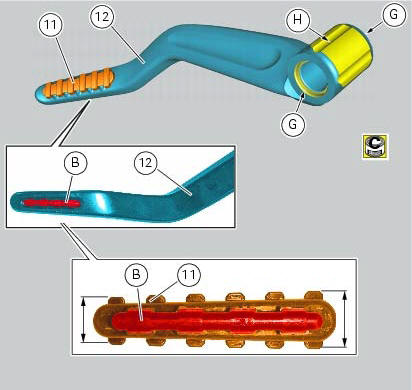
If previously removed, refit the rubber footrest (11) on the rear rh footrest (6), by pushing it until pad (b) engages in the other side.
Note
The rubber footrest (11) side featuring the least width must be faced to the outer side of the footrest (12).
Apply recommended grease to the seats (g) of the o-rings and in area (h) on the rear rh footrest (12).
Place o-rings (9) in the relevant seats of the footrest (12).
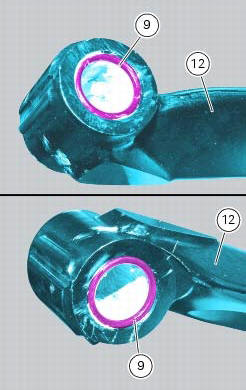
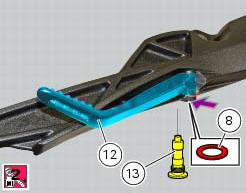
Position footrest (12) as shown, on the rear subframe rh bracket; make sure that the previously fitted o-rings do not come out of the relevant seats on the footrest (12).
Fit washer (8) between footrest (12) and the rear subframe rh bracket.
Fix the footrest (12) by starting the pin (13) smeared with specified threadlocker.
Tighten the pin (13) to a torque of 30 nm +/- 10% (sect. 3 - 3, Frame torque settings).
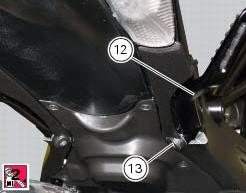
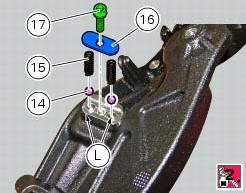
If previously removed, apply recommended grease into the holes (l) and insert balls (14) and springs (15) into the relevant holes of the rear subframe rh bracket.
Apply prescribed threadlocker on the screw thread (17).
Fit the cap (16) and tighten the screw (17) to a torque of 10 nm +/- 10% (sect. 3 - 3, Frame torque settings)
 Removing of the rear footrests
The removal of the rear footrests is described for the right side but it is
the same for both.
Undo the pin (13) and remove the rh rear footrest (12) from the frame.
Recover washer (8) and the ...
 Stands
Side stand
Side stand switch
Screw
Plate
Screw
Inner spring
Outer spring
Nut
Rotation pivot
Screw
Screw
Screw
Nut
Clearance adjuster
Spare parts catalogue
Diavel a ...
Other materials:
Spark plugs replacement
Check the colour of the ceramic insulation around the central electrode:
an even, light brown colour indicates the engine is in good condition and
running at the right temperature.
Inspect the centre electrode for wear and check spark plug gap, which should be:
0.8+/-0.1 Mm.
Important
...
Checking valve lift
Set the engine to the configuration described for the "checking and adjusting
the valve clearances", previously indicated.
Position the tool 88765.1518 On the cylinder head: the part marked "a" should be
on the intake side and the part
marked "s" should be on the exhaust side.
Seat the pl ...
Refitting the tail light
Fit the spacers with collar (3) into the rear vibration dampers (2) located
on the gloves compartment (23).
Note
Two spacers (3) must be inserted inside and outside on the right side and
two spacers (3) must be inserted inside and
outside on the left side.
Insert the split vibration damp ...