
Ducati Diavel Service Manual: Refitting the rear wheel eccentric hub and rear wheel shaft
Refitting is the reverse of removal, with attention to the following points.
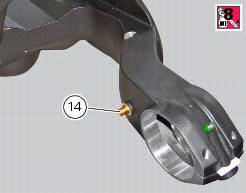
If the calliper bracket locating pin (14) was removed, apply the recommended threadlocker on reassembly.
Tighten the pin (14) to the torque of 33 nm +/- 5% (sect. 3 - 3, Frame torque settings).
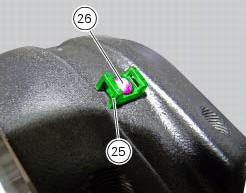
If previously removed, refit the cable grommet (25) as shown in the figure and tighten the screw (26) to a torque of 1 nm +/- 10% (sect. 3 - 3, Frame torque settings).
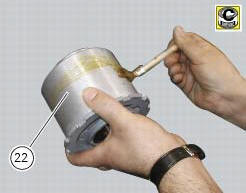
Before refitting apply some recommended grease to the eccentric hub (22) external surface.
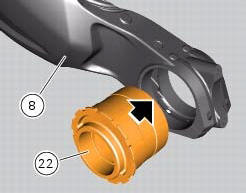
Insert the hub (22) fully home on the swingarm (8).
Note
During this operation force the hub seat open on the swingarm enough to fit the hub (22).
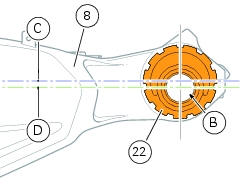
Check that the eccentric hub (22) with respect the swing arm (8) features the horizontal axis (d) of the hub bore (b) under the horizontal axis (c) of the hub seat.
Apply grease on rings (17) and place them in their seat of the plate (18). Fit the washer (16) on the eccentric hub (22).
Place the plate (18) on the swingarm: the pin (14) must match with the blind slot (t) on the plate (18).
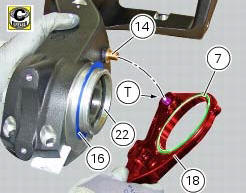
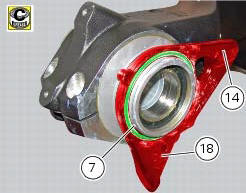
Refit the other washer (16) on the eccentric hub (22).
Block the plate (18) after installing circlip (19) in its groove (g) on hub (22), and setting it with its square edge outward.
Note
After this operation visually check that the circlip is perfectly inserted in the groove (g).
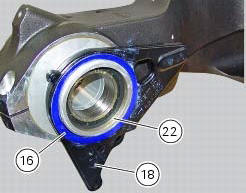
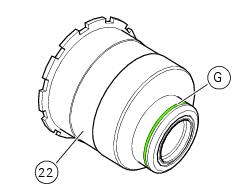
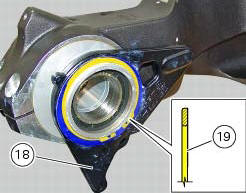
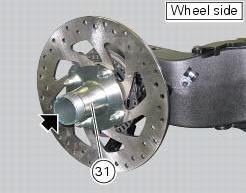
Apply an even coating of the recommended grease in the areas (a) of the axle (31).
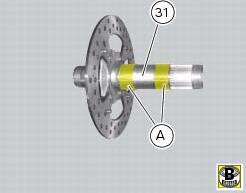
Insert the rear wheel shaft (31) in the hub (22).
Ensure the stub axle (31) is seated in the hub.
Fit the inner ring (21) on the wheel shaft (31).
Insert the inner ring (21) in the hub.
Apply the recommended grease to the screws (a) and tighten to the torque of 35 nm+/-5%(sect. 3 - 3, Frame torque settings) following the sequence 1-2-1.
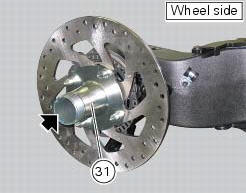
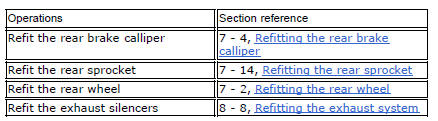
Set the chain tension as described in sect. 4 - 3, "Adjusting the chain tension".
 Removal of the rear wheel eccentric hub and rear wheel shaft
Before removing the eccentric hub, you must first remove the parts listed
below.
Slacken off the screws (34).
Remove the spacer (20) and the inner ring (21) on the chain side and remove the ...
 Removal of the swingarm
Before removing the parts in question, you must first carry out the following
operations:
Remove the rear wheel eccentric hub as described in chapter "removal of the
rear wheel eccentric hub ...
Other materials:
Refitting the expansion tank
If the support (15) has been removed, place the hose clamps (14) on the
bracket (15) orienting them as indicated.
Fully press the pins (a) to block the clamps (14) until pins surfaces (b) are at
the same level of the clamps (14) surfaces.
Apply recommended threadlocker to the thread of the ...
Recovery in the event of flat active key battery
If the active key battery is running low or is flat, the hands free system
shows the relative icon on the dashboard.
The following image shows the icon appearing on the circular area of the
dashboard: this indicates that the active key
battery is flat.
For the replacement procedure of t ...
Battery voltage indicator (battery)
This function describes the battery voltage indicator.
To access the function it is necessary to view the ""setting" menu", using
buttons (1) "s" or (2) "t" select the "battery"
function and press the reset button (3) to confirm.
The information will be displayed as follows:
if battery vol ...