
Ducati Diavel Service Manual: Refitting the side stand
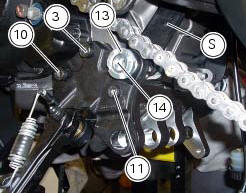
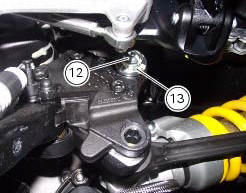
Place the stand plate on the rear shock absorber support; bring adjuster (14) in line with bracket (s) and start the screw (12) in the nut behind the bracket (s).
Insert the screws (11), (3) and (10) fully home in this order, but do not tighten.
Loosen the screw (12) with the relative nut, tighten the adjuster (14) to a torque of 0.6 Nm +/- 10% (sect. 3 - 3, Frame torque settings) and tighten the screw (12) to a torque of 2 nm +/- 10% (sect. 3 - 3, Frame torque settings) while holding the nut.
Locate service tool no. 88713.3166 On the ring nut (13) and fit the torque wrench to the tool. While holding the adjuster (14), tighten the ring nut (13) to a torque of 100 nm +/- 5% (sect. 3 - 3, Frame torque settings).
Tighten screws (11), (3) and (10) in this order to a torque of 44 nm +/- 10% (sect. 3 - 3, Frame torque settings).
Finally, tighten the screw (12) to a torque of 45 nm +/- 10% (sect. 3 - 3, Frame torque settings) while holding the nut.
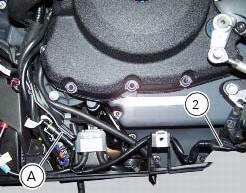
Connect connector (a) of the side stand switch to the main wiring harness.
To place the stand switch wiring refer to the table (sect. 6 - 1, Routing of wiring on frame).

 Removing of the side stand
Disconnect connector (a) of the stand switch (2) from the main wiring.
Loosen the screws (3), (10), (11) and (12) securing the stand bracket (4) to
the engine and remove the complete side
...
 Frame inspection
Frame
Rh subframe
Lh subframe
Grub screw
Nut
Special screw
Rubber pad
Nut
Special screw
Screw
Left-hand bracket
Hose clip
Hose clip
Right-hand bracket
Special screw
...
Other materials:
Checking the coolant level
To the specified intervals in the "scheduled maintenance chart" (sect. 4 - 2)
Check the coolant level contained in
the expansion reservoir, on the right side of the vehicle.
The coolant level must be between the max. And min marks on the tank.
If the level is low, top up with the recommende ...
Engine setting function (engine power control)
This function customises engine power and output.
To access the function it is necessary to view the ""setting" menu", using
buttons (1) "s" or (2) "t" select the "riding
mode" function and press the reset button (3) to enter the following page.
Use button (1) "s" or (2) "t" to select the r ...
Tft - parameter setting/display
Warning
Any adjustments to the instrument panel must only be
carried out when the motorcycle is stationary. Never operate
the instrument panel controls while riding the motorcycle.
At the end of the check, the instrument panel always
displays as the "main" indication the odometer (to ...