
Ducati Diavel Service Manual: Refitting the throttle twistgrip
Lubricate the ends of the throttle grip cables (10) and the twistgrip race with the recommended grease.
The closing cable (10) features a writing on the yellow tube, whereas the opening one (10) features such writing on the white tube.
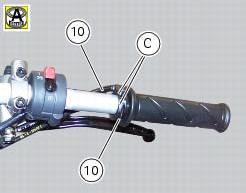
To refit the throttle control components, proceed in inverse order to the removal procedure, making sure that the twistgrip housings locate in the reference hole in the handlebar.
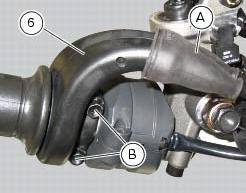
Tighten the screws (b) of throttle twistgrip (6) to a torque of 10 nm +/- 10% (sect. 3 - 3, Frame torque settings).
 Removal of the throttle twistgrip
Peel back the rubber sleeve (a) protecting the throttle control cables.
Undo the screws (b) of the throttle grip (6) and open the command.
Disconnect the throttle grip cables (10) by unhooking ...
 Hydraulic clutch control
Special screw
Sealing washer
Clutch master cylinder
Clutch hydraulic pipe (metal braid)
Screw
Spare stand
Washer
Microswitch
Pin
Bleed valve
Screw
Roller
O-ring
Clutch ...
Other materials:
Reassembly of structural components and the frame
Check for the nuts with clips (8).
Apply recommended grease on the threads of the adjusters (4) and the ring
nuts (5) having care not to have grease on
the surface (c) of the adjusters.
Tighten the adjusters on the ring nut side opposite to that featuring flats
until bringing the surfac ...
Vehicle speed indicator
this function displays vehicle speed (km/h or mph
depending on the set measurement system).
the instrument panel receives information about the actual
speed and displays the number increased by 5%.
maximum speed displayed is 299 km/h (186 mph).
over 299 km/h (186 mph) a series of dashes w ...
Instrument panel diagnosis
This function identifies any abnormal vehicle behaviours.
The instrument panel activates any abnormal vehicle
behaviours in real time (errors).
At key-on (at the end of the check) one or more "errors"
are displayed in red (only if they are active).
When an "error" is t ...