
Ducati Diavel Service Manual: Removal of the fuel tank

On the usa version remove the canister filter as indicated in sect. 8 - 10, "Removal of the evaporative emissions canister".
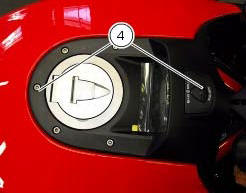
Loosen and remove the front retaining screw (4)
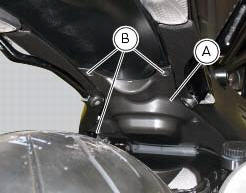
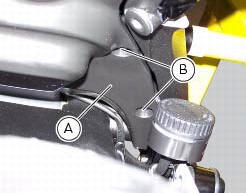
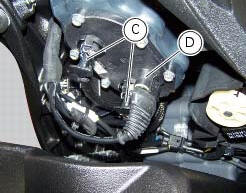
Remove the flange cover (a) by loosening the screws (b), disconnect the quick-release fittings (c) from the flange, and connector (d) of the fuel level sensor from the main wiring.
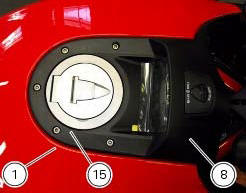
On both sides of the tank plug, paying attention not to damage them, slide out the two breather pipes (8) and (15).
Remove the tank (1).
 Fuel tank
fuel tank
Rubber pad
Spacer
Screw
Hose
Tray
Y-fitting
Hose
Hose
Filler cap
Screw
Complete hose guide
Screw
Hose clip
Hose
Screw
Screw
Sealing washer
Screw
...
 Removal of the fuel tank filler cap
Remove tank covers (sect. 5 - 2, Removal of the fuel tank fairings).
Remove hoses (8) and (15) from the filler cap assembly (10).
Open the filler cap.
Unscrew the outer screws (17) securing ...
Other materials:
Passive key
Introduction
The passive key (1) is used when the active key is not working correctly or
is not available.
The passive key works as a transponder, and must therefore be placed physically
onto the antenna to work.
The mechanical part (2) of the key is used to open the seat or the tank plug ...
Frame torque settings
*Dynamic safety-critical point; tightening torque must be within nm +/-5%.
Note
For product specifications and symbols, refer to "product specifications"
(sect. 1 - 2). ...
Removal of the evaporative emissions canister
Loosen the screws (9) securing the plate (8) to the tank.
Slightly pull the plate (8) with the canister (13), remove the clamps (3) and
(12) and connect hoses (7) and (14).
Release the retainers (b) of the plate (8) to remove it from the canister
(13).
Disconnect the hose ...