
Ducati Diavel Service Manual: Removal of the fuel tank filler cap
Remove tank covers (sect. 5 - 2, Removal of the fuel tank fairings).
Remove hoses (8) and (15) from the filler cap assembly (10).
Open the filler cap.
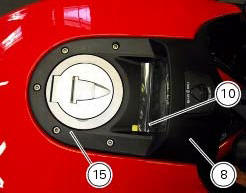
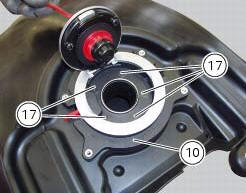
Unscrew the outer screws (17) securing the ring nut to the filler cap recess.
Remove the filler cap assembly (10).
 Removal of the fuel tank
On the usa version remove the canister filter as indicated in sect. 8 - 10,
"Removal of the evaporative emissions
canister".
Loosen and remove the front retaining screw (4)
Remove the f ...
 Refitting the filler cap
Position seal (18) in tank cap (10) as shown and reassemble following the
removal procedure in the reverse sequence.
In particular tighten the screws (17) to a torque of 3 nm +/- 10% (sect. 3 - ...
Other materials:
Passenger grabhandle
Passenger grabhandle (1, fig. 107) Is located inside the tail
guard; to take it out, remove the seat (see "removal of the
seat" on page 119), pull the knob (2, fig. 107) While taking out
the grabhandle (1, fig. 107) From its housing until it is fully
extended.
Warning
Before use, pu ...
Refitting the rear sprocket
Check the cush drive bushes (6) condition and, if necessary, replace them by
removing them from the flange.
Refitting is the reverse of removal.
Apply recommended grease on the rear sprocket flange (5) external diameter.
Place the rear sprocket flange (5) on sprocket (17) by inserting it ...
How to turn the motorcycle off
To turn the motorcycle off, turn the switch from "run on" to "run off". The
engine stops. To switch the dashboard off,
push the on/off switch downwards. When released, the switch automatically
returns to the "run off" position.
Push the switch downwards to switch the engine off and enter " ...