
Ducati Diavel Service Manual: Removal of the tail light

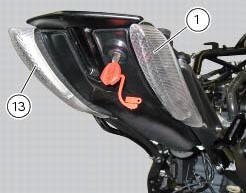
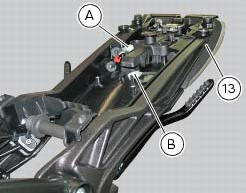
Disconnect the connectors (a) and (b) of the tail lights (1) and (13).
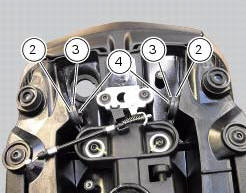
Loosen the screws (4) and slide the tail lights (1) and (13) to the rear side; recover the four spacers (3) and the washers (14).
 Refitting the number plate holder
Place the number plate light (5), as indicated, on the number plate holder
plate (8) and tighten the screws (7) to a torque
of 2 nm +/- 10% (sect. 3 - 3, Frame torque settings).
Thread the numbe ...
 Refitting the tail light
Fit the spacers with collar (3) into the rear vibration dampers (2) located
on the gloves compartment (23).
Note
Two spacers (3) must be inserted inside and outside on the right side and
two spa ...
Other materials:
Hands free
Hands free
Special screw
Plug
Electric fuel plug
Button
Spring
Frame
Elastic pin
Spare parts catalogue
Diavel abs handlebar and controls
Diavel carbon
abs
handlebar and controls
Important
Bold reference numbers in this section identify parts not shown in the
figures a ...
Wiring diagram of the hands free system
The diagram illustrates the inputs, outputs and communication lines used by
the hands free system.
1I - on/off button placed on the hands free system (located below the plastic
cover)
2I - on/off button placed on the bike handlebar rh side
3I - steering position micro-switch
4I - steerin ...
Operating principle
Introduction
The hands free system features two separate on/off buttons, either one of
which may be used as preferred by the rider.
For practical reasons, we recommend using the button on the handlebar rather
than the button located underneath the
plastic shield covering the hands free syst ...