
Ducati Diavel Service Manual: Removal of the timing belt covers
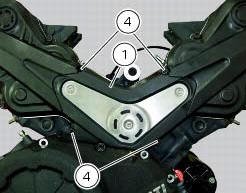
Loosen the screws (4) securing the central external cover (1) and remove it from the central side.
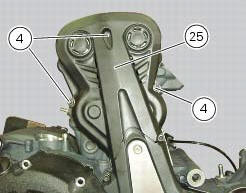
Undo the fixing screws (4) of the external cover (25) and remove it from the vertical thermal unit.
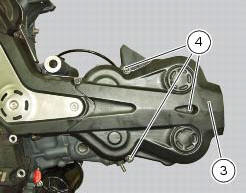
Undo the fixing screws (4) of the external cover (3) and remove it from the horizontal thermal unit.
 Timing system
Central external cover
Air filter
Horizontal cylinder timing belt cover
Screw
Filter support
Screw
Washer
Nut
Tensioner pulley assembly
Circlip
Camshaft pulley
Tensioner p ...
 Removal of the movable tensioner/timing belt
Loosen the nut (8) and remove the washer (7) and the tensioner pulley (9)
from the pin (12) on the cylinder head.
Remove the timing belt (14) from the horizontal cylinder assembly.
Important
If ...
Other materials:
Stop light not working
Fault codes
Dds: stop light diagnosis -> stop light error (generic stop light malfunction
indication).
Dashboard: the error "stop light" is shown on the service display. The eobd
warning light activates.
Wiring diagram
Db dashboard connection, bbs bbs unit connection, a front brake ...
Disassembly of the oil pump
Hold the oil pump (1) in a vice taking care not to damage the drive gear
(12).
Warning
Make sure that vice jaws are faced with soft material.
Remove the plug (14) and extract the spring (16) and by-pass valve (17).
Check the condition of the above components.
Remove the circlip (6) ...
Gearchange mechanism
Return spring
Washer
Special screw
Gear pawl assembly
Interlock plunger holder
Sealing washer
Detent ball spring
Ball
Circlip
Selector claw return spring
Shim washer
Ring
Nut
Selector drum control fork
Gearchange lever pin
Shaft with gearchange lever arm
Gearch ...