
Ducati Diavel Service Manual: Removing the valves
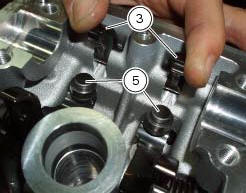
Raise the rocker arm (3) and remove the opening shim (5) from the valves with a pair of pliers.
Push down the closing rocker arms (16) and (4) and the closing shim (7).
Remove the half rings (6) from the valves with a magnetic screwdriver. Extract the closing shims (7) from the valve using a pair of pliers.

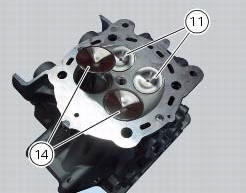
Withdraw the valves (14) and (11) from underside of the cylinder head.
Repeat the same procedure for the other cylinder head.
 Removal of the cylinder heads
Using the tool code 88713.2676, Undo the nuts (21) on the cylinder head stud
bolts.
Remove the cylinder head nuts (21) and special washers (22).
Remove the cylinder head assembly by lift ...
 Removing the valve rocker arms
With the cylinder head in the condition described in the previous paragraph,
remove the rocker arms.
Unscrew the eight plugs (12) and recover the seals (15).
Using an m6 screw, withdraw ...
Other materials:
Refitting the number plate holder
Place the number plate light (5), as indicated, on the number plate holder
plate (8) and tighten the screws (7) to a torque
of 2 nm +/- 10% (sect. 3 - 3, Frame torque settings).
Thread the number plate light wiring (c) into the opening in the number plate
holder plate as shown.
Fit ...
Checking and topping up coolant level
Check coolant level in the expansion tank on the right side of
the vehicle.
Steer the handlebar completely to the left and check that the
level is between the min and max marks on the side of the
expansion reservoir.
Top up if the level is below the min mark.
Unscrew the filler plug (1) ...
Useful information for safe riding
Warning
Read this section before riding your motorcycle.
Many accidents are the result of the inexperience of the
rider. Always make sure you have your licence with you; you
need a valid licence that entitles you to ride a motorcycle.
Do not lend your motorcycle to persons who are
inexperie ...