
Ducati Diavel Service Manual: Riding mode customisation
This function customises each riding style.
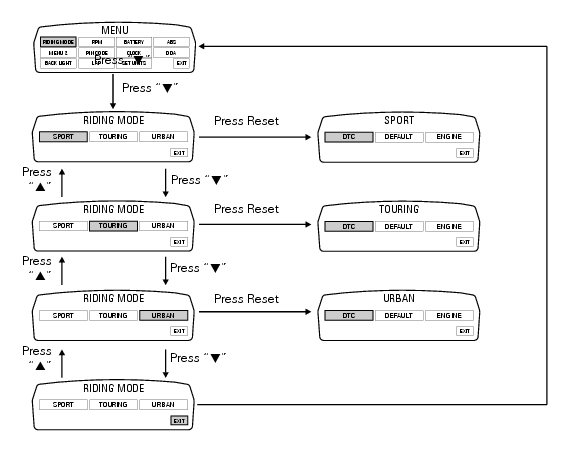
To access the function it is necessary to view the ""setting" menu", using buttons (1) "s" or (2) "t" select the "riding mode" function and press the reset button (3) to enter the following page.
When accessing the function, the three riding modes appear on the display; to customise the parameters, use buttons (1) "s" or (2) "t" to select the riding mode to be modified and press reset (3) to confirm.
The parameters that can be "customised" are "dtc" (ducati traction control) and '"engine".
Any parameter change made is saved in the memory also after a battery-off.
To modify the dtc parameters see the paragraph "dtc (ducati traction control) setting function".
To modify the engine parameters see the paragraph "engine setting function (engine power control)".
The parameters set by ducati for each individual riding style can be restored with the "default" function.
To reset the "default" parameters see paragraph "default function (resetting ducati default parameters)".
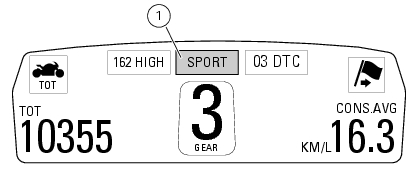
If the parameters have not been modified (customised) or are reset using the "default" function, when you quit the setting menu, in the "main" screen, the "background" indicating the riding style (sport, touring or urban) becomes blue (1).
Changes should only be made to the parameters by people who are experts in motorcycle setup; if the parameters are changed accidentally, use the "default function (resetting ducati default parameters)" to reset the parameters.
 Setting menu
This menu is used to enable/disable and set some motorcycle functions.
To access the "setting menu" press and hold button (2) "t" for 3 seconds.
Note
When within this menu no other function can b ...
 Dtc (ducati traction control) setting function
This function allows you to customise the level of dtc intervention (ducati
traction control) or disable it for every riding
mode.
To access the function it is necessary to view the ""setting" m ...
Other materials:
Vehicle speed indicator
This function displays vehicle speed (km/h or mph depending on the set
measurement system).
The dashboard receives information about the actual speed and displays the
number increased by 5%.
Maximum speed displayed is 299 km/h (186 mph).
Over 299 km/h (186 mph) the display will show a s ...
Cleaning and replacing the spark plugs
Spark plugs are essential to smooth engine running and
should be checked at regular intervals.
The condition of the spark plugs provides a good indication of
how well the engine is running.
Have the spark plugs inspected or replaced at a ducati dealer
or authorised service centre; they will ...
Recharging the battery
Examine the label on the battery showing the check intervals in order to
determine when to test the voltage.
Charge the battery if the open circuit voltage is lower than 12.8 V. Leaving
the battery discharged for more than one
month could damage it. Check the battery charge with a voltmete ...