
Ducati Diavel Service Manual: Running lights not working
Fault codes
Dds: no fault code displayed.
Dashboard: no fault code displayed.
Location of connections and components

(A) low / high beam and parking light connections rear running light and stop light connection.
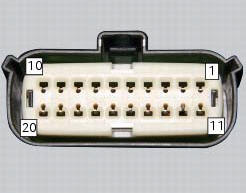
Pin numbering of wiring harness side bbs unit connection.
Checks
The front and rear parking lights use led light units and receive a 12 v power supply. Power the parking lights with an external 12 v power supply to test function (connect correctly as indicated in the wiring diagram).
Check congruence of the ground connection on the running lights.
Check that the parking lights receive 12v arriving from pin 7 of the bbs.
Check the integrity of the electrical circuit and connections (short-circuits to ground, short-circuits to vdc, open circuits).
If none of the aforementioned tests identifies the problem, replace the bbs.
Note
Check integrity of electric circuit - short-circuit to vdc = with dashboard on, using a voltmeter, a voltage is measured between the wire tested and ground.
Check integrity of electric circuit - short-circuit to ground = with the battery cables disconnected, using an ohmmeter, continuity is detected between the wire tested and ground.
Check integrity of electric circuit - open circuit = with the battery cables disconnected, using an ohmmeter, no continuity is detected between the two ends of the wire tested.
 Number plate light not working
Fault codes
Dds: no fault code displayed.
Dashboard: no fault code displayed.
Location of connections and components
Location of rear turn indicator and number plate light connection.
p ...
 Dashboard menu option scrolling not possible
Fault codes
Dds: no fault code displayed
Dashboard: no fault code displayed
Location of connections and components
Location of left hand handlebar switchgear set connection.
Pin numbering ...
Other materials:
Changing the brake fluid
Warning
Brake fluid is corrosive and will damage paintwork. Avoid contact
with eyes and skin. In the case of accidental contact,
wash the affected area thoroughly with plenty of running water.
Changing the fluid in the front brake circuit
Remove the cover (1) with the membrane from the front b ...
Refitting the side stand
Place the stand plate on the rear shock absorber support; bring adjuster (14)
in line with bracket (s) and start the screw
(12) in the nut behind the bracket (s).
Insert the screws (11), (3) and (10) fully home in this order, but do not
tighten.
Loosen the screw (12) with the relative nut ...
Number plate light not working
Fault codes
Dds: no fault code displayed.
Dashboard: no fault code displayed.
Location of connections and components
Location of rear turn indicator and number plate light connection.
pin numbering for wiring harness side dashboard connector.
Checks
The number plate light receives p ...