
Ducati Diavel Service Manual: Side stand button
Introduction
The side stand button is located on the side stand. Together with the signal from the clutch button and the neutral signal generated by the gear sensor (transmitted to the engine control unit over the can line), the side stand position signal is used to enable or disable engine start.
The following table indicates the only conditions in which starter motor
activation and, as a result, engine start, are
permitted: 
Component assembling position
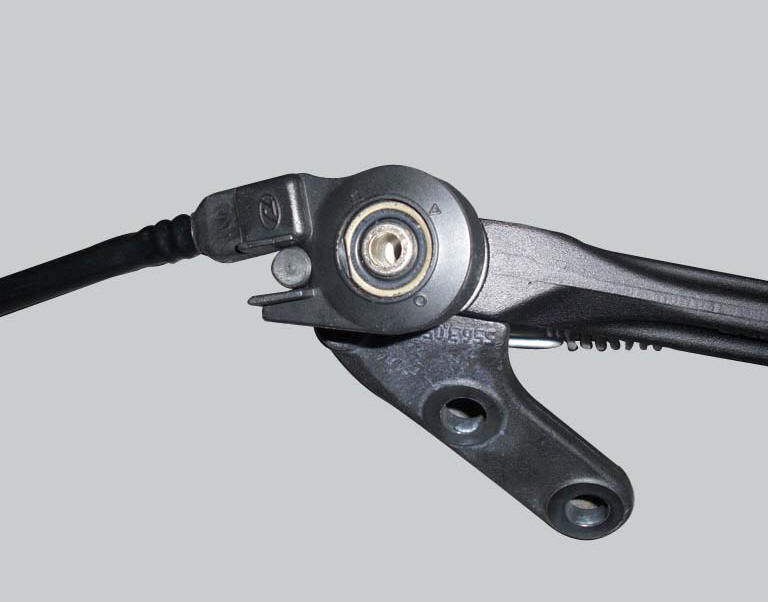
The side stand button is integrated in the rotation pivot area of the side stand itself.
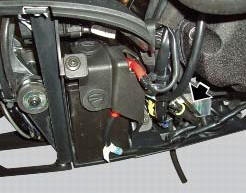
location of side stand connection.
Connection wiring diagram
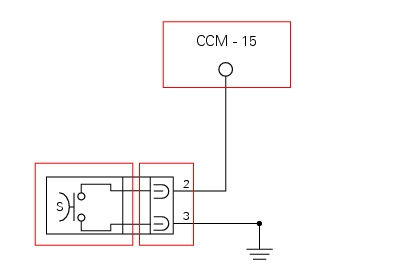
Ccm engine control connection, s side stand button. 3 Black - bk, 2 white/black - w/bk.
In the event of fault
In the event of a side stand button fault, the safety conditions described in the introduction are not met.
Fault codes generated and possible correlated faults
The engine control unit generates no fault code in the event of a side stand button fault.
No errors are indicated on the dashboard.
- Integrity of electric circuit (open circuit, short-circuit to ground and toward vdc) and of the electrical connections
- Integrity of the side stand button. When the side stand is used (extended and retracted), the resistance on the button contacts (pin 2 and pin 3) must be zero in one position (continuity) and infinite in the other (open circuit)
Note
Check integrity of electric circuit - short-circuit to vdc = with dashboard on, using a voltmeter, a voltage is measured between the wire tested and ground.
Check integrity of electric circuit - short-circuit to ground = with the battery cables disconnected, using an ohmmeter, continuity is detected between the wire tested and ground.
Check integrity of electric circuit - open circuit = with the battery cables disconnected, using an ohmmeter, no continuity is detected between the two ends of the wire tested.
The dds instrument can be used to display the activation state of the side stand button.
If none of the aforementioned tests identify the problem and the side stand button is in proper working order, replace the engine control unit.
Component replacement methods
No special measures are necessary in order to replace the side stand button.
 Clutch lever button
Introduction
The clutch button is located on the clutch lever. Together with the signal
from the side stand button and the neutral signal
generated by the gear sensor (transmitted to the engine co ...
 Injection relay
Introduction
The fuel pump, injectors and ignition coils are all powered via the injection
relay. The relay also sends voltage to the
engine control unit, which enables activation of the relay its ...
Other materials:
Throttle twistgrip
Upper clamp
Counterweight
Screw
Handlebar
Grips
Throttle twistgrip
Bush
Screw
Bush
Throttle cables
Spare parts catalogue
Diavel abs handlebar and controls
Diavel carbon
abs
handlebar and controls
Important
Bold reference numbers in this section identify parts not sh ...
Transmission
Wet clutch controlled by the lever on left-hand side of the
handlebar.
Transmission from engine to gearbox primary shaft via spur
gears.
Front chain sprocket/clutch gearwheel ratio:
33/61
6-speed gearbox with constant mesh gears, gear change
pedal on left side of motorcycle.
Gearbox ou ...
Appropriate diagnosis tools
97900.0211 Dds (ducati diagnosis system) without cables
97900.0227 Power cable and diagnosis
97900.0222 Power cable and diagnosis 1060838 (measurement module)
97900.0218 Vacuum sensor
552.1.039.1A Pressure sensor
97900.0220 Pressure/vacuum tube
97900.0221 Union
...