
Ducati Diavel Service Manual: Steering head: front fork
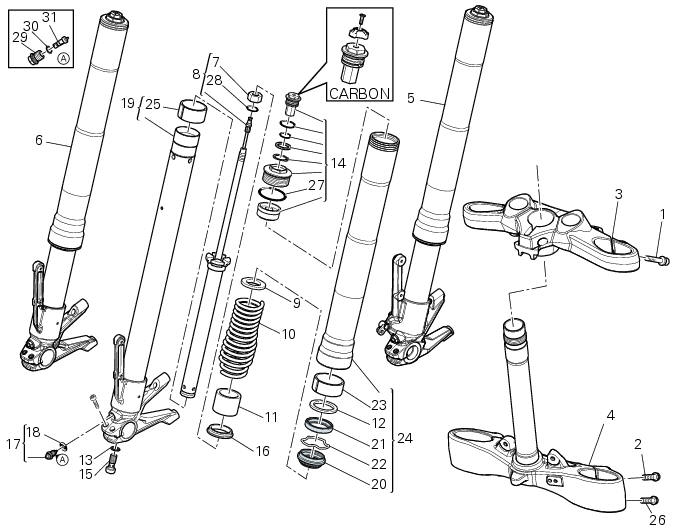
- Screw
- Screw
- Steering head
- Bottom yoke
- Left fork leg assembly
- Right fork leg assembly
- Counter nut
- Damper assembly
- Bush
- Spring
- Preload tube
- Collar
- Washer
- Top cap assembly
- Screw
- Washer
- Adjuster screw
- Special washer
- Fork tube + calliper unit
- Dust cap
- Sealing ring
- Circlip
- Upper bush
- Outer tube
- Lower bush
- Screw
- O-ring
- o-ring
- Special screw
- O-ring
- Adjuster
Spare parts catalogue
Diavel abs front forks
Diavel abs handlebar and controls
Diavel carbon abs front forks
Diavel carbon abs handlebar and controls
Important
Bold reference numbers in this section identify parts not shown in the figures alongside the text, but which can be found in the exploded view diagram.
 Fork
Fork
...
 Removal of the front forks
Before removing the front forks, it is first necessary to remove the
following parts:
Loosen the clamp screws (1) holding the fork legs to the steering head (3).
Loosen the clamp screws (2) and ...
Other materials:
Checking the engine timing
Set the engine to the configuration described for the "checking and adjusting
the valve clearances", previously indicated.
Install tool 88765.1188 (G) in the spark plug bore to determine the piston tdc,
the gauges (h) on the tool 88765.1518
And the timing check tool (degree wheel (l) 887 ...
Removal of the front mudguard
Undo the screw (7) and remove the front brake lines (a) from the hose grommet
(4).
Undo and remove the special retaining screws (5): keep the spacers (6).
Remove the front mudguard (1).
Warning
The version provided with carbon mudguards features nylon washers
instead of the spacers (6) ...
The battery charging circuit and power distribution
On the diavel, the +15v (key on power) voltage does not come from a
conventional ignition key, but from pin 30 of the
hands free relay. This relay is switched to closed state by the hands free unit
when the latter enables power on for the
ignition and engine. The hands free relay receives +30v ...