
Ducati Diavel Service Manual: Symbols - abbreviations - references
To allow quick and easy consultation, this manual uses graphic symbols to highlight situations in which maximum care is required, as well as practical advice or information. Pay attention to the meaning of the symbols since they serve to avoid repeating technical concepts or safety warnings throughout the text. The symbols should therefore be seen as an aid to memory. Please refer to this page whenever in doubt as to their meaning.
The terms right-hand and left-hand refer to the motorcycle viewed from the riding position.
Warning
Failure to comply with these instructions may put you at risk, and could lead to severe injury or even death.
Important
Failure to follow the instructions in text marked with this symbol can lead to serious damage to the motorcycle and its components.
Note
This symbol indicates additional useful information for the current operation.
Text references
References in bold type indicate a part that is not illustrated in the figures next to the text, but which can be found in the exploded views at the beginning of each chapter.
References in non-bold type indicate a part that is illustrated in the figures alongside the text.
Product specifications
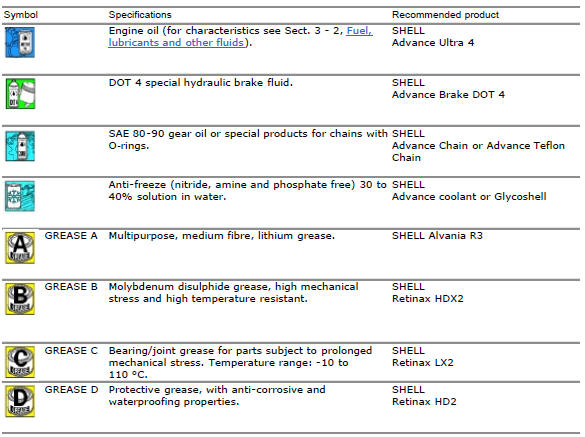
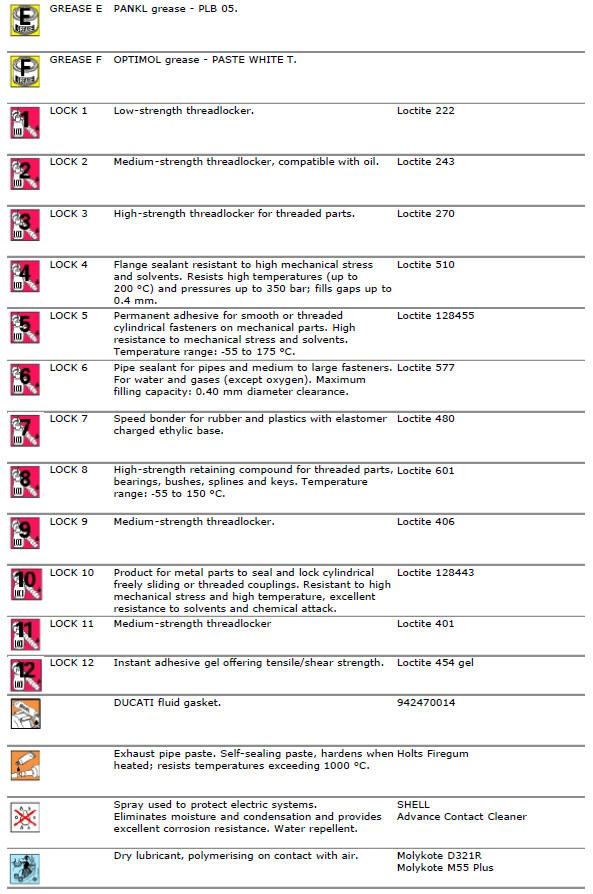
Symbols in the diagram show the type of threadlocker, sealant or lubricant to be used at the points indicated. The table below shows the symbols used and the specifications of the various products.

 How to use this manual
How to use this manual
This manual has been prepared for technical personnel at ducati authorized
service centres with the aim of providing
fundamental information on how to work in accordance wit ...

Other materials:
Removal of the rear wheel eccentric hub and rear wheel shaft
Before removing the eccentric hub, you must first remove the parts listed
below.
Slacken off the screws (34).
Remove the spacer (20) and the inner ring (21) on the chain side and remove the
wheel shaft (31) with the brake disc
(30) from the opposite side.
Remove the circlip (19 ...
Refitting the exhaust system
Refit the heat guard on the manifold (10) by tightening the nuts (9) to a
torque of 10 nm +/- 10% (sect. 3 - 3, Frame
torque settings).
Position the vertical exhaust manifold (22) on the vertical cylinder head
with the gasket (23).
Tighten the fixing nuts (21) to a torque of 10 nm +/- 1 ...
Overhauling the front brake components
Important
Critical safety components. The brake calliper manufacturer recommends
that you do not attempt to service the internal
components of the brake callipers. Incorrect overhaul of this component could
endanger rider safety.
Operations should be limited to renewal of the pads, fasteners ...