
Ducati Diavel Service Manual: Tail light - number plate holder
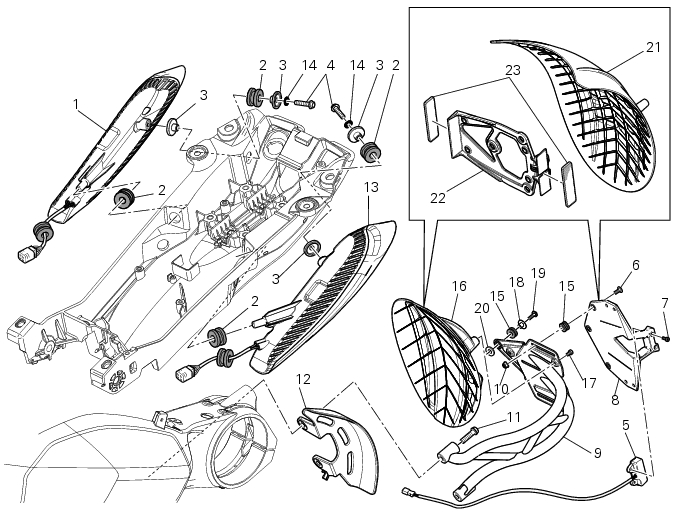
- Rh tail light
- Vibration damper mount
- Spacer
- Screw
- Number plate light
- Screw
- Screw
- Plate
- Number plate holder
- Nut
- Screw
- Rear chain guard
- Lh tail light
- Spring washer
- Vibration damper mount
- Splashguard
- Screw
- Spacer
- Screw
- Washer
- Splashguard (europe - australia)
- Plate (europe - australia)
- Reflector (europe - australia)
Spare parts catalogue
Diavel abs number plate holder - tail light
Diavel carbon abs number plate holder - tail light
Important
Bold reference numbers in this section identify parts not shown in the figures alongside the text, but which can be found in the exploded view diagram.
- Removal of the licence plate holder
- Refitting the number plate holder
- Removal of the tail light
- Refitting the tail light
 Reassembly of the tool tray
Place the tool tray unit (23) on the lateral brackets (2) and (3) by
tightening the screws (24) to 14 nm +/- 5% (sect. 3-3,
Frame torque settings).
If the handle guide (32) has been previously r ...
 Removal of the licence plate holder
Disconnect connector (5) of the number plate holder wiring from the main one.
Release the number plate holder light cable from the ties and the cable grommets
as indicated in sect- 7 - 6, fle ...
Other materials:
Hydraulic clutch control
Special screw
Sealing washer
Clutch master cylinder
Clutch hydraulic pipe (metal braid)
Screw
Spare stand
Washer
Microswitch
Pin
Bleed valve
Screw
Roller
O-ring
Clutch control rod
Clutch lever
Dust cap
Bleed valve
Special screw
Sealing washer
Boot
Plug
...
Reassembly of the front half-fairings
Fit the clips (2) on the front rh half-fairing (1).
Join the rh support (4) and the front rh half-fairing (1) and keep them in
position by starting the screws (5).
Note
To mount the rh support (4) in a proper way, it is necessary to insert the
tab (g) of the front rh half-fairing (1) in t ...
Indicator air - air temperature
This function shows the external temperature.
Display limits: -39C ÷ +124C
In the event of a sensor fault (-40C,+125C or
disconnected), a string of dashes "- - -" (not flashing) is
displayed and the "engine/vehicle diagnosis - eobd" light
(7, fig. 4) Comes on.
N ...