
Ducati Diavel Service Manual: Tester power supply
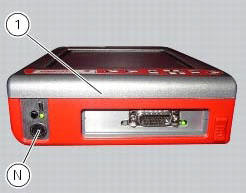
The dds (1) part number 97900.0215 Can be powered from the vehicle as follows:
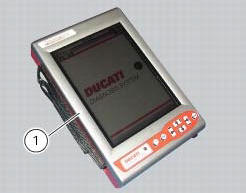
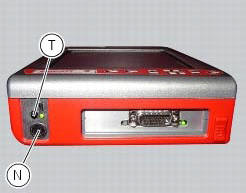
- From the mains power supply: by connecting the power supply connector
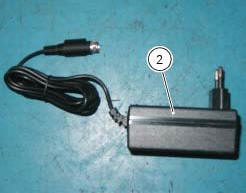
(n) to the network power supply (2) part no.
97900.0224;
- From the motorcycle: connecting the corresponding cables (see paragraph "connection to the motorcycle");
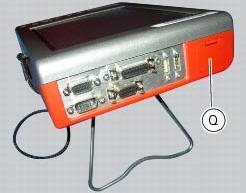
- From the tester's internal battery: the battery (q) is housed in the top part of the tester. To operate the tester (1) using the internal battery and to recharge the battery, refer to the "user manual" supplied with the dds diagnosis instrument.
To switch on the display, press the button (t).
Connection to the motorcycle
The tester requires a power supply voltage within 9 and 16 volts d.C.
Make sure voltage never drops below this limit during operation: this situation could occur during engine starting and idling on motorcycles in which the battery is not in perfect working order. If the tester detects a power supply voltage lower than 9 volts, the current procedures will be reset; when the voltage returns to the acceptable tolerance limits the procedure must start again from the beginning.
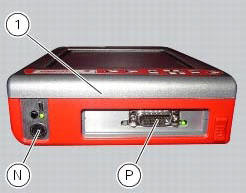
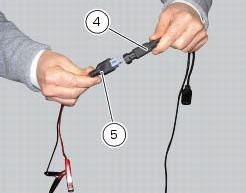
The dds diagnosis instrument (1) may be powered from the motorcycle in any one of the following ways:
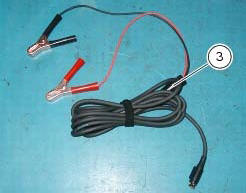
- By connecting the instrument power connector (n) to the battery connector (3) part no. 97900.0230 And the latter to the vehicle battery;
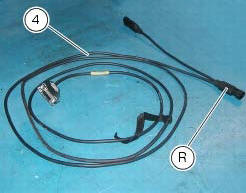
- By connecting the instrument diagnosis connector (p) with the power
supply and diagnosis cable (4) part no.
97900.0227S; then connect the supply and diagnosis cable outlet (r) with the battery adaptor (5) part no.
97900.0228 And the adapter to the bike battery.
Note
For connection of the various devices required for self-diagnostic procedures, consult the instruction handbook supplied with the tester.
 Description of the diagnosis instrument (dds)
The "dds" diagnostic system lets you diagnose any faults in the
injection-ignition system via a serial port. The system is
also equipped with functions to test various devices on the motorcycle. Th ...
 Dds diagnosis instrument
The main functions of the dds diagnosis instrument can be summarised as
follows:
Retrieval of errors (faults) of the ignition-injection system stored in
the engine control unit memory and the ...
Other materials:
How to use this manual
How to use this manual
This manual has been prepared for technical personnel at ducati authorized
service centres with the aim of providing
fundamental information on how to work in accordance with the modern concepts of
"best practice" and "safety in the
workplace" during the maintenance, re ...
Seat
Seat
Seat cover
Rubber mounting
Special screw
Plate
Latch
Spare parts catalogue
Diavel abs seat
Diavel carbon
abs
seat
Important
Bold reference numbers in this section identify parts not shown in the
figures alongside the text, but which can be found in
the exploded view ...
Overhaul of the flywheel-alternator assembly
Examine the inner part of alternator rotor (24) for signs of damage. Check
that the starter clutch is working properly and
that the needle races do not show signs of wear or damage of any kind. If there
is any malfunction, remove the whole
assembly.
Disassembling the generator flywheel
U ...