
Ducati Diavel Service Manual: Tft - parameter setting/display
Warning
Any adjustments to the dashboard must only be carried out when the motorcycle is stationary. Never operate the dashboard controls while riding the motorcycle.
At the end of the check, the dashboard always displays as the "main" indication the odometer (tot) on the left and the average fuel consumption on the right (unless menu 2 was disabled).
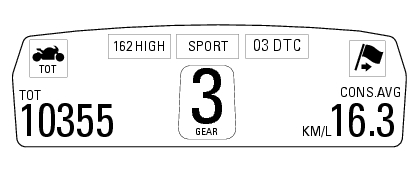
At the end of the initial check, the dashboard will always show the "main" display, indicating the following information: set "riding style" (riding mode); gear indication (gear); menu 1: odometer (tot); menu 2: average fuel consumption (cons. Avg).
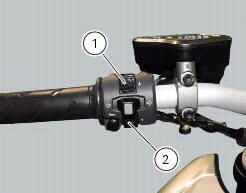
By pressing the button (1) "s" it is possible to switch to the following functions of menu 1: trip1 - trip meter 1; trip2 - trip meter 2; trip fuel - distance travelled on fuel reserve (only if active); by pressing the button (2) "t" it is possible to switch to the following functions of menu 2: cons. - Current fuel consumption; speed avg - average speed; trip time - trip time; air - air temperature; menu 2 viewing can be disabled through the "menu 2" function of the setting menu.
 Dashboard on tank
Menu 1 (tot, trip1, trip2, trip fuel).
Menu 2 (cons.Avg., Cons., Speed avg, air and trip time) if active.
Gear / neutral indication.
Icon referred to the function below from menu 1.
Indicat ...
 Total distance covered indicator: "odometer"
This function shows the total distance covered by the vehicle (in km or miles
depending on the specific application).
At key-on the system automatically enters this function.
The odometer read ...
Other materials:
Hands free key (hf) not recognised
The activation of this (amber yellow) "warning" indicates that the hands free
system does not detect the active key (1,
fig.62) Near the vehicle.
Note
Check that the active key (a) is near the vehicle (and has not been lost)
or that it works properly.
...
Refitting the handlebar
Position the handlebar (4) so that the external lower corner of the marks (a)
on the handlebar matches the upper internal
corner of the lower u-bolts (b) as shown.
Apply the recommended grease to the threads and undersides of the heads of
the screws (3).
Important
Position the upper u-bo ...
Abs disabling function
This function disables or enables the abs.
To access the function it is necessary to view the "setting" menu page 48, using
button (1, fig. 14) ?"
" or (2, fig. 14) ?"" select the "abs" function and
press the reset button
(12, fig. 12) To go to next ...