
Ducati Diavel Service Manual: Throttle twistgrip
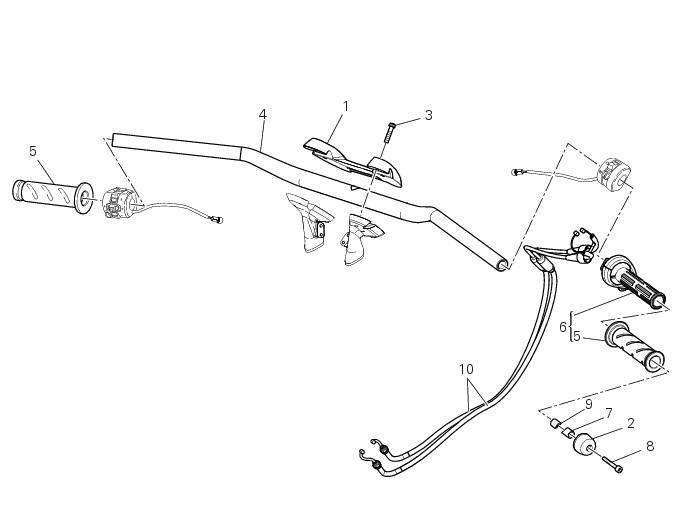
- Upper clamp
- Counterweight
- Screw
- Handlebar
- Grips
- Throttle twistgrip
- Bush
- Screw
- Bush
- Throttle cables
Spare parts catalogue
Diavel abs handlebar and controls
Diavel carbon abs handlebar and controls
Important
Bold reference numbers in this section identify parts not shown in the figures alongside the text, but which can be found in the exploded view diagram.
- Removal of the handlebar
- Refitting the handlebar
- Removal of the throttle twistgrip
- Refitting the throttle twistgrip
 Handlebar unit
...
 Removal of the handlebar
Unscrew and remove the screws (3) securing the upper clamp (1).
Remove the upper clamp (1).
Remove the handlebar (4) from its seat on the steering head.
To remove the grips (5), refer ...
Other materials:
General cleaning
To preserve the finish of metal parts and paintwork, wash
and clean your motorcycle at regular intervals, anyway
according to the road conditions you ride in. Use specific
products, where possible biodegradable. Avoid aggressive
detergents or solvents.
Use only water and neutral soap to clean ...
Refitting the clutch-side crankcase cover
Clean and degrease mating surfaces on the clutch-side crankcase half cover
and crankcase and ensure that locating bush
(12) and the o-ring (11), located in correspondence with the oil way, are
installed in the crankcase.
Apply an even, regular bead of ducati liquid gasket (a) on the mating ...
California emission control warranty statement
Your warranty rights and obligations
The california air resources board is pleased to explain the
emission control system warranty on your my 2011
motorcycle. In california, new motor vehicles must be
designated, built and equipped to meet the state's stringent
anti-smog standards. Ducati north ...