
Ducati Diavel Service Manual: Total distance covered indicator: "odometer"
This function shows the total distance covered by the vehicle (in km or miles depending on the specific application).
At key-on the system automatically enters this function.
The odometer reading is stored permanently and cannot be reset.
If the distance travelled exceeds 199999 km (or 199999 miles), the value "199999" will be displayed permanently.
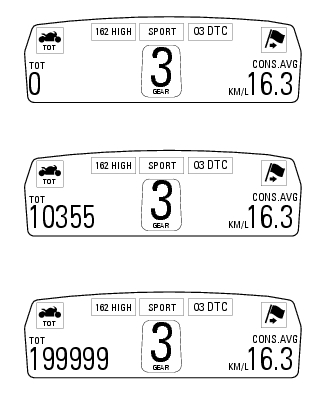
 Tft - parameter setting/display
Warning
Any adjustments to the dashboard must only be carried out when the
motorcycle is stationary. Never operate the
dashboard controls while riding the motorcycle.
At the end of the check, the ...
 Trip 1 meter
This function shows the distance travelled since the trip meter was last
reset (in km or miles depending on the specific
application).
Press and hold (1) "s" for 3 seconds while in this function ...
Other materials:
Removing of the rear wheel
Place the motorcycle on the rear service stand and engage the 1st gear.
Remove the clip (6).
Using a suitable socket wrench, loosen the wheel nut (1).
Fully unscrew the nut (1), then remove the washer (2) and the spacer (3).
Remove the rear wheel from the motorcycle.
...
Hydraulic clutch control
Special screw
Sealing washer
Clutch master cylinder
Clutch hydraulic pipe (metal braid)
Screw
Spare stand
Washer
Microswitch
Pin
Bleed valve
Screw
Roller
O-ring
Clutch control rod
Clutch lever
Dust cap
Bleed valve
Special screw
Sealing washer
Boot
Plug
...
Refitting the front mudguard
Warning
Do not use the motorcycle without the front mudguard fitted to avoid
the risk of the brake pipes fouling the wheel on
braking.
Insert the screws (5) in spacers (6) with recommended threadlocker, as shown
in the figure.
Position the front mudguard (1) and start the special screws (5 ...