
Ducati Diavel Service Manual: Warning indication (alarms/signals)
The dashboard activates in real-time some warnings / malfunction that are not dangerous for the correct operation of the vehicle.
At key-on (at the end of the check) one or more "warnings" are displayed if they are active.
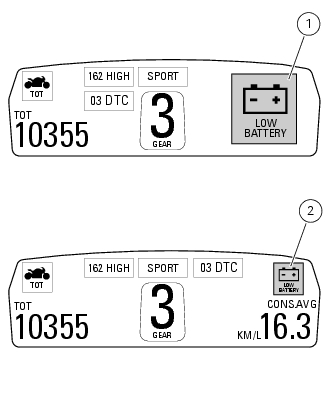
When a "warning" is triggered, the indication (amber yellow) remains well visible (1) for 10 seconds then becomes smaller (2).
If there are multiple indicators, they will scroll automatically every 3 seconds.
Note
No signal lights turn on if one or more "warnings" are activated.
The following "warnings" could be displayed: "low" battery level (low battery); traction control "deactivated" (dtc off); hands free key (hf) "not recognised"; "low" hands free key (hf) battery level; "high" engine coolant temperature (high temp); steering release error - steering still locked (unlock error).
With one or more "warnings" active, the user may access other functions by pushing button (2) "t".
 Indication of range reached for service
When service coupon threshold is achieved, upon every key-on the system
displays the indication of the type of
intervention that is required (oil service or desmo service).
The (red) warning is ...
 Low battery level
The activation of this (amber yellow) "warning" indicates that the status of
the battery vehicle is low.
It is activated when the battery voltage is ¼ 11.0 Volt.
Note
In this case, ducati ...
Other materials:
Limited liability
The liability of ducati under this emission control systems
warranty is limited solely to the remedying of defects in
material or workmanship by an authorized ducati motorcycle
dealer at its place of business during customary business
hours. This warranty does not cover inconvenience or l ...
Units of measurement modification function
This function allows you to change the units of measurement
of the displayed values.
To access the function it is necessary to view the "setting" menu page 48, using
button (1, fig. 14) ?"" or (2, fig.
14) ?" " select the "set units" function
and pre ...
Beam setting
When checking beam setting, put the motorcycle upright.
Tyres should be inflated at the correct pressure and one
person should be sitting astride the motorcycle, keeping it at
right angles to its longitudinal axis. Place the motorcycle
opposite a wall or a screen, 10 meters apart from it, draw ...