
Ducati Diavel Service Manual: Water radiators
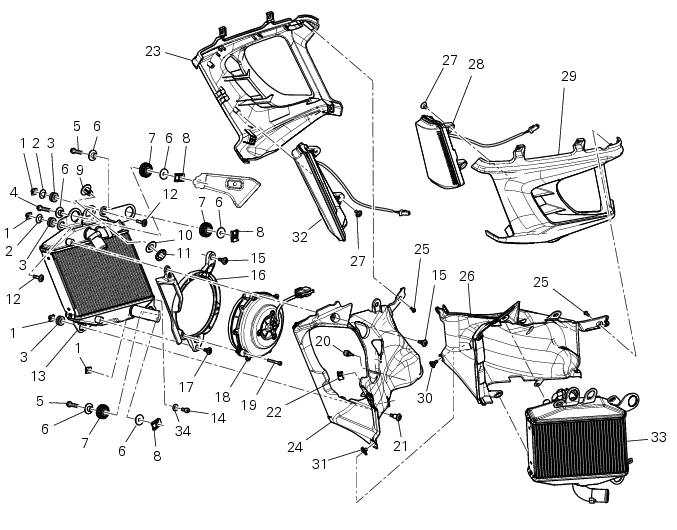
- Clip nut
- Spacer
- Vibration damper mount
- Screw
- Screw
- Spacer
- Vibration damper mount
- Clip nut
- Bush
- Spacer
- Rear sprocket
- Screw
- Water radiator (right)
- Screw
- Screw
- Air deflector (right)
- Special screw
- Electro-fan
- Screw
- Vibration damper mount
- Screw
- Plug
- Half-fairing (right)
- Internal air duct
- Screw
- Internal air duct
- Screw
- Front turn indicator
- Half-fairing (left)
- Special screw
- Clip nut
- Front turn indicator
- Water radiator (left)
- Washer
- Screw
Spare parts catalogue
Diavel abs radiator (right)
Diavel abs radiator (left)
Diavel abs half fairing
Diavel carbon abs radiator (right)
Diavel carbon abs radiator (left)
Diavel carbon abs half fairing
Important
Bold reference numbers in this section identify parts not shown in the figures alongside the text, but which can be found in the exploded view diagram.
The exploded view shows only the rh water radiator since the left one features the same components except the plug (22).
- Removing the water radiators
- Disassembling the water radiator unit
- Renewal of the cooling fan
- Reassembling the water radiator unit
- Refitting the radiator
 Refitting the cooling system hoses and unions
Position the pump/radiator sleeve (22) and the radiator/radiator sleeve (23).
Fit sleeve (23) and sleeve (22) to their corresponding fittings (n) and (o), and
bring them fully home on collars (p) ...
 Removing the water radiators
Loosen the screws (p) that retain the supports (s) of the front splashguard
to the air ducts (24) and (26).
Loosen the screws (30), to separate the two internal air ducts (24) and (26). ...
Other materials:
Abs system operating information
The response of the system is based on the analysis of the speed signals for
front and rear wheels; the system is
automatically deactivated if either of these signals is missing.
Note
In the event of the abs control unit detecting a fault in the abs
electronic management system, it activates ...
Separation of the crankcase halves
Use two screwdrivers to remove the circlip (29) from the timing belt
driveshaft shaft (30) on the clutch-side crankcase
half.
Note
Take care to avoid scoring the surface of the shaft while removing the
circlip.
Unscrew the crankcase half screws on the chain side.
Unscrew ...
Operations to be carried out by the dealer
List of operations to be performed at 1000 km
Reading of the error memory with dds on the engine control units,
vehicle and abs
Change the engine oil
Change the engine oil filter
Check the indicators and lighting
Check the safety devices (side ...